Blog
What is a softphone?
A softphone is phone software running on a computer instead of a desk phone. What it needs, who it suits, who it does not, and where the audio breaks.
John · Owner and CEO · 7 min read ·
A softphone is a phone that runs as software on a computer, either in a browser tab or as an installed application. It uses your internet connection instead of a phone line and your headset instead of a handset. The number, the ring and the transfer button all still work.
The hardware is what goes away. Nothing else about the call does.
What a softphone actually is
Strip away the vocabulary and a softphone does three things.
It registers. When you sign in, the software tells a phone system where you are, so that a call to your business number knows which screen to ring. That conversation is signalling, and on most systems it follows SIP, defined in RFC 3261, which is the standard that describes how a call is set up, answered, put on hold and torn down. Signalling is not the audio. It is the arrangement about the audio, and that distinction turns up again the moment something breaks.
It carries audio. Your voice is measured thousands of times a second, cut into packets, and sent to the far end while its packets come back. This is the part that has to arrive on time, every time, and it is why a call is harder on a network than a download is.
It gives you the controls. Answer, hold, transfer, add somebody, hang up. On a desk phone those are keys. On a softphone they are buttons with names next to them, which is why an assisted transfer stops being frightening for people who never learned the key sequence.
That is the whole of it. Everything else in a softphone, the contact list, the call history, the presence dot, is convenience built on top of those three jobs.
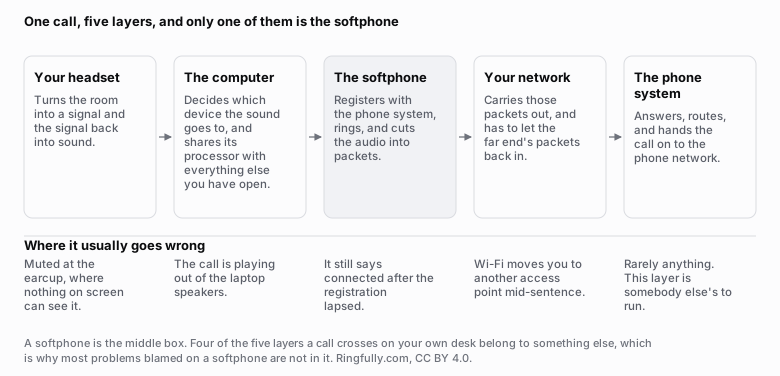
A softphone is the middle box of five. Four of the layers a call crosses on your desk belong to something else.
Reuse this figure anywhere, including commercially, with credit to Ringfully and a link back to this page. CC BY 4.0.
Look at the figure for a moment, because it is the reason this cluster of articles is arranged the way it is. The softphone is one of five layers, and the four either side of it are the headset, the operating system's sound settings, your network and the phone system. When somebody says the softphone is broken, the odds are that the fault is in one of the other four, and the useful question is which. The list of symptoms and their tests works down those layers in order.
What it needs to work
Four things, and only one of them is usually missing.
A computer that is awake. This is the difference that surprises people most. A desk phone rings whether or not anyone has touched it in three hours. A closed laptop does not. If your team shuts the lid at lunch, you have shut the phone.
A headset with a microphone. Laptop speakers and a laptop microphone will technically work and will make you sound like you are calling from a stairwell. The far end hears the room, the fan and their own voice coming back. A headset is not an accessory here, it is the handset, and which kind you buy has real consequences.
Spare upload capacity. One call on the common codec costs under 90 kilobits a second in each direction once the packet headers are counted. Ten simultaneous calls is under a megabit. That is rarely the constraint, but it is the upload that runs out first on a typical business connection, and the arithmetic is worth doing once rather than guessing.
A connection that is steady, not just fast. Capacity is the easy half. What ruins a call is delay and variation in delay. ITU-T's Recommendation G.114 on one-way transmission time is the reference the whole industry plans against: it treats up to 150 milliseconds one way as acceptable for most applications, and puts the point where a conversation becomes unacceptable for general network planning at 400 milliseconds. A connection with room to spare can still miss that, which is why a speed test is not a phone test.
Who a softphone suits
People who already work at a computer all day. If your team is on a screen from nine to five, the phone is one more window and the transition costs nothing.
Teams who move. Somebody who works two days at home does not have two desk phones. They have one login.
Small teams that grow unevenly. Adding a person is an account rather than a purchase order, which changes what a fifth hire costs. That is a real part of what a business phone system actually costs to run, and it is the part quotes tend to leave out.
Anyone who needs to see what happened. A softphone puts the call history, the notes and the recording in the same place as the call, so a colleague reads what happened instead of reconstructing it.
Who it does not suit
Being honest about this is more useful than a feature list.
A shop floor, a warehouse, a workshop. Loud, dusty, and nobody is at a screen. A physical phone on a wall is the right answer.
A reception desk that answers constantly. Some receptionists are genuinely faster on a keypad they have used for nine years, and there is no argument that beats nine years of muscle memory. A desk phone alongside the software is a legitimate answer, and the honest comparison is here.
Anyone who will not wear a headset. This sounds trivial and it decides the outcome. A person who takes the headset off between calls will miss the next one, and a person who refuses one entirely will sound bad on every call they take. If you know somebody like this, give them a handset and stop arguing.
A site with a network nobody manages. Softphones expose an unmanaged network faster than anything else you can install, because a call notices problems a web page never will.
What a softphone is not
It is not a phone line. The number, the line and the software are three separate things, and a number that looks valid is not necessarily an active line.
It is not a guarantee of better sound. Most business calls still travel as 8 kHz narrowband audio, because that is what the phone network carries. Softphone to softphone inside the same system can do better. A call to a customer on a cell phone cannot.
It is not a way to avoid buying anything. You will buy headsets, and you should buy decent ones. The saving is in the phones, not the peripherals.
How to tell whether it is working, before you commit
Run a two-week trial that answers real calls, and check four things at the end of it.
- Did anybody miss calls because their machine was asleep? This is the failure that shows up in week one and gets rationalised away.
- Does the audio hold at your busiest hour, not at four in the afternoon on a quiet Thursday.
- Can everyone transfer a call without being told how, twice? If not, it is the software, not the people.
- What did the network do when somebody moved rooms mid-call? Walk around during a call on purpose.
If you would rather answer those before you choose a product than after, the six questions to ask about any softphone are the checklist we would use.
What Ringfully actually gives you
Two clients, and it is worth being plain about the boundary. There is a softphone inside the portal that runs in a web browser, and there is a Windows desktop application. Both take the same calls with the same controls: hold, transfer straight through, transfer after a consult, adding a third person, per-person mute, and a note that lands on the call record. A company picks one or uses both.
There is nothing else. No client for a phone in your pocket. What exists instead is forwarding: someone can point their calls at their own cell number, and their colleagues see them as forwarded rather than as an empty desk that may or may not have rung.
If that boundary works for your team, what a plan costs is per seat rather than per device, so a person who uses the browser and the desktop application is still one seat. If it does not, a desk phone alongside the software is a reasonable answer and we would rather say so than sell you a phone system your receptionist will fight.
More of the same cluster lives under softphones and apps.
Figures on this page are CC BY 4.0. The signalling description follows RFC 3261 and the delay figures are from ITU-T Recommendation G.114, both linked above, as read on 2026-09-09.
Questions people ask
- What is a softphone in simple terms?
- It is a telephone that exists as software rather than as an object. It runs in a browser tab or as an application on a computer, it carries your business number, and it rings, holds, transfers and hangs up exactly as a desk phone does. The audio travels over your internet connection instead of a phone line, and you hear it through a headset instead of a handset.
- What do I need for a softphone to work?
- Four things: a computer that stays awake during working hours, a headset with a microphone, an internet connection with enough spare upload capacity for the calls you take at once, and a phone system to register with. The headset is the one people skip, and it is the one that decides how the call sounds to the person you called.
- Is a softphone as reliable as a desk phone?
- It depends on which failure you care about. A softphone rides on a computer, so a sleeping laptop is an unanswered phone and a busy processor can break up the audio. A desk phone has neither problem, and instead goes down with the network switch that powers it. Neither is more reliable in general; they fail in different places.
- Does a softphone need a special internet connection?
- No, but it needs headroom on the upload rather than the download, because a conversation sends one audio stream in each direction. A single call on the common codec is under 90 kilobits a second each way, so capacity is rarely the problem. Delay, and variation in that delay, is what actually decides whether a call sounds right.
- Can two people share one softphone?
- Not the same session. Each person signs in as themselves, so the call history, the presence state and the permissions belong to a person rather than to a desk. That is one of the practical differences from a shared handset, and it is usually an improvement, because you can see who took the call.
About the author
John
Owner and CEO
Owner and CEO with over 10 years of experience in the IT industry, including more than 5 years specializing in VoIP and cloud communications. Experienced in designing, deploying, and supporting reliable communication solutions for businesses.

Keep reading
If you are deciding how your team should answer calls at a computer, tell us what people use today and where they work, and we will show you what answering in the browser or the Windows app looks like.