Blog
What to look for in a softphone app
Codecs, audio device handling, presence, network changes and setup. Six questions to put to a softphone app, and the answers that should worry you.
John · Owner and CEO · 7 min read ·
Six questions decide whether a softphone is pleasant to use in month three, and none of them appears on a feature comparison grid: codec negotiation, audio device handling, behaviour on a network change, whether presence tells the truth, how it reaches a new machine, and what it does when the phone system is unreachable.
Every one is testable in an afternoon. Here is what to look for.
What the feature grid does not measure
Comparison pages count what is easy to count. Video, chat, a contact list, a dial pad, call recording, a tick in every row. All of it is real, and none of it is what people complain about after the novelty wears off.
The complaints are always the same shape: the call came out of the laptop speakers, nobody could hear me, it said I was available when I was not, it stopped working when I changed desks, and setting it up on the new starter's machine took an hour. Those are the six below.
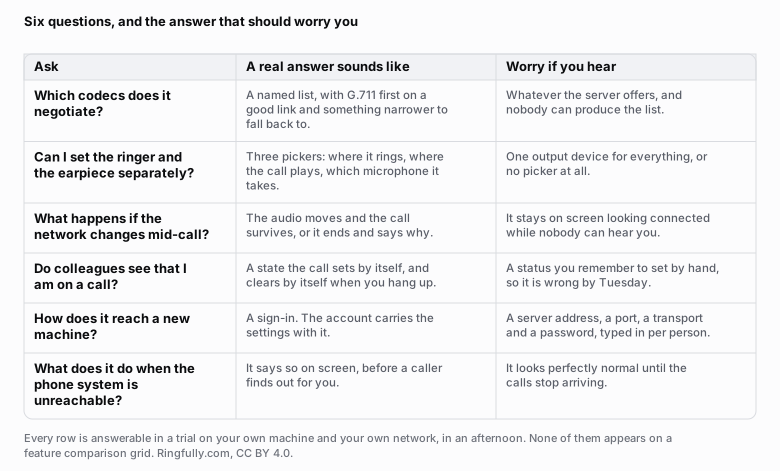
Six questions, each answerable in a trial on your own machine, and none of them found on a feature comparison grid.
Reuse this figure anywhere, including commercially, with credit to Ringfully and a link back to this page. CC BY 4.0.
Which codecs does it negotiate?
A codec is the agreement about how your voice becomes bits. The two ends negotiate one at the start of the call, from lists they each carry, and the payload types they choose between are catalogued in RFC 3551, the RTP profile for audio and video, which is where G.711 sits as payload types 0 and 8.
What you want to hear:
- G.711, both flavours. This is what the phone network itself carries, and it is the safe floor. Any call that leaves your building ends up here anyway.
- Opus, or something like it, for the difficult links. The value is not higher fidelity, it is that it degrades gradually as a connection worsens instead of collapsing.
- A list somebody can actually produce. This is the real test. A vendor who cannot tell you which codecs their client offers has a client nobody has looked inside for a while.
What should worry you is "whatever the server negotiates" delivered as a complete answer. It is technically true of every softphone and tells you nothing. The follow-up question is what happens on a poor connection, and the answer should describe a fallback rather than a hope. The arithmetic behind those choices, and what each codec actually costs on your connection, is in how much bandwidth VoIP needs.
Can you point the ringer and the earpiece at different devices?
This is the least glamorous item on the list and the one that causes the most day-to-day misery.
A softphone uses the computer's sound settings, and the computer changes those without asking. Plug in a monitor with speakers, join a meeting, connect a headset, and the default output moves. If the softphone follows the default blindly, then the ring goes wherever the default went, which is sometimes a monitor facing away from you and sometimes nowhere at all.
What good looks like is three separate pickers:
- Where it rings. Nail this to the laptop speakers. You want to hear a call arrive whether or not the headset is on your head.
- Where the call plays. The headset.
- Which microphone it takes. Also the headset, explicitly, not "default".
A softphone with one output picker, or none, will produce a steady trickle of missed calls and calls nobody can hear, and every one of them will be reported as a fault in the phone system. It is the first row of the audio troubleshooting ladder for exactly this reason.
What happens when the network changes mid-call?
Somebody will unplug a cable, walk out of range, or move from Wi-Fi to a hotspot, in the middle of a call, this month.
There are three possible behaviours and only one is unacceptable. The call can move to the new path and continue, which is what a client doing connectivity checks in the manner of RFC 8445, the ICE specification, is able to do. Or the call can end and say why, which is honest. Or the call can stay on screen, showing a timer, connected to nothing, while both people say hello into silence.
Test it deliberately. Start a call to a colleague, pull the network cable out, plug it back in, and watch what the screen says. Then do the same by walking to the far end of the office. Nobody demonstrates this to you, so you have to do it yourself.
Does the on-a-call state tell the truth?
A presence dot that a person sets by hand is wrong by Tuesday morning. Everybody has met the colleague who has been in a meeting since March.
What is worth having is a state the call sets and clears by itself: on a call, not on a call, signed out. That is the state a colleague checks before transferring somebody to you, and if it is unreliable then people stop checking, and calls get handed to empty desks. That is a routing problem masquerading as a display problem, and it is why the same question matters when you are working out how many people you need answering calls.
Ask specifically whether the state comes from the call or from a menu. A client that offers both is fine. A client that offers only the menu is a client where the dot is decoration.
How does it reach a new machine?
Watch somebody set it up from scratch, on a machine that has never had it, and time it.
The good version is a sign-in. The person enters the credentials they already have, and the settings, the number and the permissions arrive with the account.
The version to avoid is a form asking for a server address, a port, a transport, a registration interval and a password, per person, per device. It works. It also means every new starter is a support ticket, every re-imaged laptop is another one, and one mistyped port produces a phone that registers, rings, and drops every second call for reasons nobody can see. If your team has to touch that form, someone in your business has just become a phone technician.
What does it do when the phone system is unreachable?
The last question, and the one nobody thinks to ask.
When the connection to the phone system goes, a good client says so, visibly, on the screen, before a caller discovers it for you. A bad client looks completely normal, because the last thing it knew was that everything was fine, and the calls simply stop arriving.
The test is simple and slightly rude: turn the network off for two minutes while the client is open, and watch. Then turn it back on and see how long it takes to notice. If the answer is "it never noticed", you have found a client that will one day let a whole morning of calls go missing without a single symptom on anybody's screen.
The trial that answers all six
An afternoon on a clean machine on a quiet network proves nothing. Two weeks of real calls proves most of it.
- Week one, use it normally. Everyone, on their own machines, with everything they normally have open.
- Week two, break it on purpose. Unplug cables mid-call. Close lids. Walk out of Wi-Fi range. Open the heaviest thing anybody runs and take a call while it works.
- Then ask three people what annoyed them. The answers will map onto the six questions above almost exactly.
If the client passes those and your team still finds the calls unpleasant, the fault is probably not in the software at all: it is in the headsets, and which kind you buy has real consequences. If you want a second opinion on what you are looking at, tell us what the client does and does not do and we will say plainly whether it is a problem worth moving for.
Everything else in this cluster, starting with what a softphone is, is filed under softphones and apps.
Figures on this page are CC BY 4.0. The payload types are from RFC 3551 and the connectivity-check behaviour from RFC 8445, both linked above, as read on 2026-09-09.
Questions people ask
- What should I look for in a softphone app?
- Six things, none of which appear on a feature comparison grid: which codecs it negotiates, whether you can point the ringer and the call audio at different devices, what it does when the network changes mid-call, whether the on-a-call state sets itself, how it reaches a new machine, and how it behaves when the phone system is unreachable. Every one of them is testable in an afternoon.
- Which codecs should a softphone support?
- At minimum G.711 in both its flavours, because that is what the phone network itself carries and what every system can fall back to. Opus is the one worth having on top, because it degrades gracefully on a poor connection rather than falling apart. What matters more than the list is that somebody can produce the list at all.
- Why does audio device handling matter so much?
- Because a softphone borrows the computer's sound settings, and the computer changes them without asking. Plugging in a monitor, joining a meeting or connecting a headset can move the default output. A softphone that lets you nail the ringer to the laptop speakers and the call to the headset removes the single most common cause of missed and inaudible calls.
- How do I test a softphone before buying?
- Take real calls on it for two weeks, at your busiest hour, on the machines your team actually uses. Then deliberately break things: unplug the network cable mid-call, close a lid, walk to the far end of the office, and open everything you normally have open at once. A demonstration on a clean machine and a quiet network tells you nothing you needed to know.
- Does a softphone need to be an installed application, or is a browser tab enough?
- A browser tab negotiates the same codecs and carries the same controls, so for most people it is enough. An installed application has two practical advantages: it can be told to start with the computer, and it is harder to close by accident along with thirty other tabs. Some teams use both, which is the same account either way.
About the author
John
Owner and CEO
Owner and CEO with over 10 years of experience in the IT industry, including more than 5 years specializing in VoIP and cloud communications. Experienced in designing, deploying, and supporting reliable communication solutions for businesses.

Keep reading
If you are deciding how your team should answer calls at a computer, tell us what people use today and where they work, and we will show you what answering in the browser or the Windows app looks like.