Blog
Headsets that work with a softphone
Wired, Bluetooth or DECT, which microphone, and whether the buttons reach the software. What actually matters in a headset, without naming brands.
John · Owner and CEO · 7 min read ·
For someone at a desk all day, a wired USB headset with a boom microphone. No battery, nothing to pair, nothing competing for its radio, and buttons that reliably reach the software. Wireless is worth its trade-offs only for people who need to stand up and keep talking, and then the question is Bluetooth or DECT.
That is the short version. The rest is why, and what to check before you buy twelve of anything.
What actually matters, and what does not
Headset recommendations age badly. Models are discontinued, revisions change the microphone, and a list of product names written this year is wrong by the time somebody reads it. So this article names properties instead, which you can check against whatever is on the shelf.
The properties that matter, in order:
- How it connects, because that decides what can interfere with it.
- The microphone, because that is the part your customer hears.
- Whether the buttons on it reach the software, because a mute nobody can see causes half of all call problems.
- Whether the person will actually wear it, which is not a specification and decides everything.
The properties that matter less than the box implies: the frequency response of the speakers, the material of the earcups, and the number of hours of battery life beyond about eight.
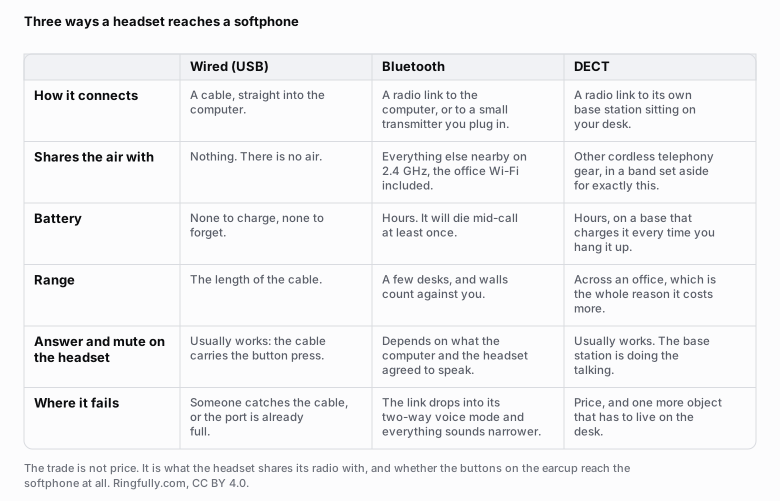
The trade is not price. It is what the headset shares its radio with, and whether the buttons reach the software.
Reuse this figure anywhere, including commercially, with credit to Ringfully and a link back to this page. CC BY 4.0.
Wired, Bluetooth or DECT
Wired USB is the default and should be. There is no battery to run out mid-afternoon, no pairing to lose, nothing sharing its air with the office Wi-Fi, and no mode switching. The cable carries power, audio and button presses on one connection the computer already trusts. It fails in exactly two ways: somebody catches the cable, and the port is already occupied.
Bluetooth buys you a few desks of range and costs you two things. The first is that it shares the 2.4 GHz band with the office Wi-Fi, other headsets and everything else nearby, so a crowded room produces dropouts that no setting fixes. The second is the mode switch. A Bluetooth headset carries playback in one mode and has to move to a narrower two-way mode the moment your microphone is part of the link, which is why music sounds excellent and the call that follows it sounds noticeably worse. This is normal, expected behaviour: the profile that governs a hands-free device with a microphone is the Hands-Free Profile published by the Bluetooth SIG, currently at version 1.9, and it is a different thing from the profile used for listening to music.
DECT solves the interference half. A DECT headset talks to its own base station on the desk, in a band set aside for cordless telephony rather than the shared one, and it will cross an office and keep going. It costs more, it puts one more object on the desk, and it is genuinely worth it for a person who has to stand up, walk to a colleague and keep talking. For anyone who sits down all day it is money spent on range they never use.
The microphone is the part the caller hears
Everything above concerns your comfort. The microphone concerns your customer, and it is where the money should go.
A boom microphone beats a microphone in the earcup, for one reason that has nothing to do with quality of components: it is close to your mouth. Distance is the whole game. A microphone two centimetres from your lips picks up mostly you; a microphone on a cable at chest height picks up you and the room in roughly equal measure, and the room includes the colleague on the phone behind you.
Directional beats omnidirectional for the same reason. A microphone built to hear what is directly in front of it and ignore the rest is what "noise cancelling" means when it is printed next to a microphone, and it is the specification worth paying for in any shared space.
What no headset can do is make the line better than the line. A call to a customer on a cell phone is carried as 8 kHz narrowband audio, the format described by ITU-T Recommendation G.711: 8,000 samples a second, everything above roughly 4 kHz discarded. Your headset cannot put back what the network drops. The same ceiling is why a greeting recorded in a studio still sounds like a phone message once a caller hears it.
So the honest promise of a good headset is not that you will sound rich and warm. It is that the caller will hear you and not your office.
The buttons, and whether they reach the software
A headset with an answer button, a mute button and a volume wheel is pleasant. A headset whose buttons the softphone does not understand is worse than one with no buttons at all, because the mute button will still mute the microphone in hardware while the screen shows an open microphone, and the person wearing it will spend a minute talking to nobody.
Three things to check on the actual headset, with the actual software, before you buy the other eleven:
- Press mute on the headset. Does the softphone show muted? If the screen does not change, you have a mute nobody can see, and it will be the first item on the audio troubleshooting list forever.
- Press answer on the headset when a call arrives. Does it answer? Often this needs a small piece of vendor software on the computer. Decide whether you are willing to install and maintain that on every machine.
- Swing the boom up. Many headsets mute when you do, and people do it absent-mindedly while reading.
What to buy for whom
Buying twelve identical headsets is tidy and usually wrong.
- Somebody on calls most of the day at one desk: wired USB, boom microphone, one ear if they need to hear the room, both if they need to concentrate.
- Somebody who takes a few calls and needs to move: DECT, if the walking is real. Bluetooth if it is occasional.
- Somebody who works from home two days a week: whatever they already own, plus a wired one at the office. Do not buy two of the expensive thing.
- The person who will not wear a headset at all: stop. Buy them a handset and let them keep it. A desk phone alongside the software is a legitimate answer for one person, and it costs less than losing the argument every week for a year.
Buy one of each of your top two candidates first, put them on the two people who take the most calls, and give it a fortnight. The one that comes back is the one to avoid.
What we do not sell
Ringfully does not sell headsets, take a margin on them, or have a certified hardware list. That is deliberate: a phone system that only works properly with hardware it sells you is a phone system with a second price on it.
What that means practically is that any headset your computer recognises works with the softphone, whether that is the browser softphone in the portal or the Windows desktop application, because both use the computer's own audio devices. It also means we cannot tell you which model to buy, only which properties to look for, which is what the rest of this article has been about.
Since the hardware is your own, what a plan costs is per person rather than per device, and there is no line on it for equipment. The headset budget is separate, it is small, and it is the highest-return money in this whole exercise.
Everything else in this cluster, starting with what a softphone is and what it needs, is filed under softphones and apps.
Figures on this page are CC BY 4.0. The Bluetooth profile reference is the Bluetooth SIG's Hands-Free Profile page and the narrowband audio description follows ITU-T Recommendation G.711, both linked above, as read on 2026-09-09.
Questions people ask
- What kind of headset is best for a softphone?
- A wired USB headset with a boom microphone, for anyone who sits at one desk and takes calls all day. It has no battery, nothing to pair, nothing sharing its radio with the office Wi-Fi, and its buttons reliably reach the software. Wireless is worth the trade only for people who need to stand up and keep talking.
- Are Bluetooth headphones good enough for business calls?
- They are usable and they are not the best choice for someone on calls all day. A Bluetooth link uses one mode for playback and a narrower two-way mode the moment it has to carry your microphone too, so the same headset that sounds excellent playing music sounds noticeably worse on a call. It also shares the 2.4 GHz band with the office Wi-Fi and everything else nearby.
- What is a DECT headset and is it worth the money?
- It is a wireless headset that talks to its own base station on your desk rather than to the computer's Bluetooth, using a band set aside for cordless telephony instead of the crowded one Wi-Fi lives in. It is worth the money for people who need to walk the length of an office while talking, and is hard to justify for anyone who does not.
- Does an expensive headset make callers hear me better?
- Up to a point, and the point is lower than the price list suggests. A call to a customer on a cell phone is carried as 8 kHz narrowband audio no matter what you are wearing, so a headset cannot make the line better than the line. What a good microphone does is stop the caller hearing the room, which is the difference people actually notice.
- Do I need noise cancelling on a headset?
- Two different things carry that label. Microphone noise cancelling, which stops the caller hearing your office, is worth paying for in any shared space. Speaker noise cancelling, which stops you hearing the office, helps you concentrate and does nothing for the person on the other end. If you buy one of the two, buy the first.
- Should a headset cover one ear or both?
- One ear if you work in a room with colleagues you need to hear, both if you need to concentrate or the room is loud. It is a preference rather than a quality question, and it is worth letting people choose rather than buying twelve of the same thing.
About the author
John
Owner and CEO
Owner and CEO with over 10 years of experience in the IT industry, including more than 5 years specializing in VoIP and cloud communications. Experienced in designing, deploying, and supporting reliable communication solutions for businesses.

Keep reading
If you are deciding how your team should answer calls at a computer, tell us what people use today and where they work, and we will show you what answering in the browser or the Windows app looks like.