Blog
Softphone vs desk phone: the real trade
Audio path, power, what happens when the laptop sleeps, and the person who will not wear a headset. A fair comparison of softphones and desk phones.
John · Owner and CEO · 7 min read ·
A desk phone has a dedicated audio path and rings whether or not anything else is switched on. A softphone costs nothing per person, follows your login to any desk, and puts names beside the transfer buttons. That is the whole trade. Everything else is detail.
The detail still matters, because two of those details decide it for most teams. If the software side is the unfamiliar one, what a softphone is covers what the program actually does before this article weighs it against a handset.
The one real difference: the audio path
A desk phone contains an earpiece and a microphone that do nothing else, wired to a processor with one job. Nothing on that device is going to start playing a notification sound in your ear, and nothing is going to take the microphone away from the call because another program asked for it first.
A softphone borrows the computer's audio stack, and shares it with the browser, the meeting software, the operating system's alerts and whatever the last program to ask for the microphone was. That is where most softphone audio complaints actually come from, and it is why the fixes are mostly outside the softphone.
What the trade is not is call quality on the line. A call to a customer on a cell phone is carried as 8 kHz narrowband audio regardless of what you answered it on, because that is what ITU-T Recommendation G.711 describes and what the phone network still runs on: 8,000 samples a second, eight bits each, 64 kilobits a second of audio. A desk phone cannot beat that ceiling and neither can software. Where the desk phone genuinely wins is consistency. It sounds the same on the day the computer is compiling something.
The browser case is worth naming separately, because a browser softphone is not a compromised version of an installed one. RFC 7874 requires every WebRTC endpoint to implement Opus and both flavours of G.711, so a browser tab negotiates the same codecs a hardware phone does. What it does not get is the dedicated hardware, which brings us back to the same paragraph.
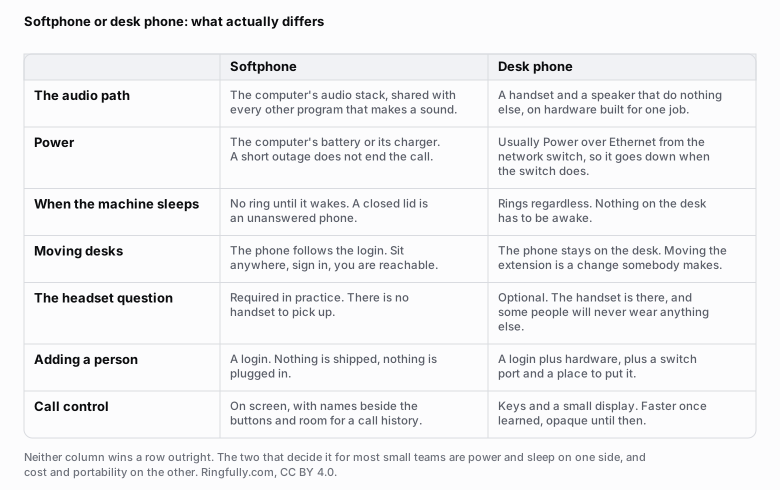
Seven rows that differ, written so neither column wins outright. Power and sleep decide it one way; cost and portability the other.
Reuse this figure anywhere, including commercially, with credit to Ringfully and a link back to this page. CC BY 4.0.
Power, and what actually happens in an outage
The received wisdom is that desk phones keep working when the power goes and softphones do not. It is wrong in both directions.
A modern desk phone almost always takes its power from the network switch over the same cable that carries the calls. So it goes down when the switch goes down, which is when the power goes. A laptop, meanwhile, has a battery and keeps running.
What ends the call in both cases is the same thing: the internet connection. The modem and the router are mains-powered, and when they stop, every phone in the building stops, hardware or software. If calls genuinely have to survive a cut, the answer is a battery on the network gear, or a rule in the phone system that sends calls to cell numbers when nothing answers. The choice of handset has almost nothing to do with it.
The sleeping laptop
This is the failure that catches teams out, and it has nothing to do with sound.
A desk phone is always on. A laptop with the lid closed is a phone that is switched off, and so is one that went to sleep at 12:40 because everybody went for lunch. The call arrives, finds nobody, and does whatever your phone system does with an unanswered call.
There are two honest ways to handle it. Change the machines so they do not sleep during working hours, which is a settings change somebody makes once. Or accept it and build the fallback: a rule that moves the call on after a set number of rings, to a colleague, to a group, or to voicemail. Most teams need that rule anyway, because somebody is always already on a call, and building it once covers both.
The person who will not wear a headset
Every team has one, and they will decide this for you.
A softphone has no handset. You pick up a call by clicking, and you listen through whatever is on your head. Somebody who takes the headset off between calls will miss the ring. Somebody who refuses one and uses the laptop speakers will be on speakerphone all day, in an office, with the far end hearing the room and their own voice back.
This is not a training problem you can win. If a person answers forty calls a day and hates headsets, buy them a desk phone. It costs less than three months of arguing, and the rest of the team can still be on software.
Cost, honestly
A desk phone is a one-off purchase, a switch port and a place on the desk. Call it a couple of hundred dollars a person, spread over the years it lasts, plus the hour somebody spends provisioning it.
A softphone is zero. There is nothing to buy except the headset, and you need the headset either way once anybody works from home.
What that changes is not the total, it is the shape. Hardware makes the fifth hire a purchase and a delay; software makes it a sign-in. If you are working out what the whole thing costs, the handsets are one line in a longer list, and the lines that get left out of a quote are usually bigger than this one. Our own plans are priced per seat rather than per device, so a person using both the browser and the desktop application is still one seat.
The mixed answer is usually the right one
Most small teams do not have to choose once for everybody.
- People who work at a screen all day: softphone. The controls are on screen, and the call history is beside them.
- The person who answers the main line constantly: a handset, if that is what they are fast on.
- Meeting rooms, lobbies, workshops: hardware. A shared space has no login.
- Anyone who works from more than one place: softphone, because a second desk phone is a second purchase and a second thing to configure.
The requirement that makes this work is that both register to the same phone system, so a call can be handed from a handset to a laptop without anybody thinking about which is which, and a transfer with an introduction behaves the same on both.
Worth saying plainly, because it changes what the mixed answer means if you are reading this on our site: Ringfully has no desk phones. People answer in a browser tab or in the Windows desktop application, with a headset. If the reception counter or the workshop needs a handset on the wall, that half comes from somewhere else, and it is better to know that now than to find it in a quote.
How to decide in a week
Give it a real week, not a demonstration.
- Take real calls on the software, at your busiest hour, with the machines set up as they normally are.
- Close a lid on purpose and see what your phone system does with the call. If the answer is unsatisfying, that is a routing rule to fix, not a reason to abandon the plan.
- Ask the two loudest complainers what they want. They are the ones who will use it forty times a day.
- Count what a handset would actually cost you, including the person who installs it, before deciding it is expensive.
If you want a straight answer about which parts of your team should be on which, describe the setup and we will say so, including when the answer is that you should keep the phones you have.
The rest of this cluster, including what to look for in the software itself, is filed under softphones and apps.
Figures on this page are CC BY 4.0. The narrowband audio description follows ITU-T Recommendation G.711 and the browser codec requirement is from RFC 7874, both linked above, as read on 2026-09-09.
Questions people ask
- Is a softphone better than a desk phone?
- Neither is better in general, and anybody who says otherwise is selling one of them. A desk phone has a dedicated audio path and rings whether or not a computer is awake. A softphone costs nothing per person, follows the login to any desk, and puts names next to the transfer buttons. The right answer for most small teams is softphones for the people at screens and a handset for the person who answers constantly.
- Do desk phones sound better than softphones?
- The hardware usually does, and the call often does not. A desk phone has a handset, an earpiece and a microphone built for one job, with nothing else on the machine competing for them. But a call to a customer on a cell phone is carried as 8 kHz narrowband audio either way, so the ceiling is set by the phone network rather than by your end of it. Where a desk phone reliably wins is consistency: it sounds the same on a bad day.
- What happens to a softphone in a power cut?
- A laptop keeps running on its battery, and then the internet connection goes, so the call ends within seconds unless the router and the modem are on a battery too. A desk phone typically takes its power from the network switch, so it dies with the switch. Neither survives an outage on its own. If calls have to keep working through one, the answer is a battery on the network gear, or forwarding to cell phones.
- Can I use both a softphone and a desk phone?
- Yes, and for a lot of small teams that is the correct answer rather than a compromise. The people who live at a screen use the software; the person who answers the main line all day keeps a handset. What matters is that both register to the same phone system, so a call can be handed from one to the other without anybody thinking about it.
- Do I still need desk phones for a meeting room or a lobby?
- Usually yes. A phone in a shared space has no login and no owner, which is exactly what a piece of hardware is good at. A softphone belongs to a person, so putting one on a shared machine means somebody's account is signed in on a computer anybody can use, which is a permissions problem rather than a phone problem.
About the author
John
Owner and CEO
Owner and CEO with over 10 years of experience in the IT industry, including more than 5 years specializing in VoIP and cloud communications. Experienced in designing, deploying, and supporting reliable communication solutions for businesses.

Keep reading
If you are deciding how your team should answer calls at a computer, tell us what people use today and where they work, and we will show you what answering in the browser or the Windows app looks like.