Blog
Why your phone system rejects your greeting
Your greeting plays on a laptop and the phone system refuses it. What the upload checks, what 8 kHz mono means, and how to convert the file in your browser.
Owner and CEO · 7 min read ·
Your greeting plays fine on a laptop because a laptop plays anything. Your phone system wants one specific thing: a WAV file at 8 kHz, one channel, 16-bit PCM (or mu-law), and most recorders and editors export 44.1 kHz stereo MP3 instead. Convert it and it uploads.
That is the whole answer. The rest of this is why, what the conversion does to the sound, and how to do it without installing anything.
What is the phone system actually checking?
Three things, in the order it finds them in the file.
- The container. A WAV file: a short header, then the samples. Some systems accept MP3 too; a few want the samples with no header at all.
- The sample rate. How many times a second the sound was measured. A phone line was built around 8,000, written 8 kHz.
- The channel count. One. A call has no left and right.
Some also check the bit depth (16-bit) and the encoding inside the WAV (plain PCM, or mu-law, or A-law). A file that misses any one of these gets "unsupported format", "invalid file", or an upload that simply does nothing, and the message rarely says which number was wrong.
The reason a phone system is this fussy is that it does not convert. It stores the bytes and plays them straight into the call. Older equipment had no spare processor to resample a file on the way in, and a lot of hosted systems inherited the rule without the reason. The same rule applies to a greeting, a closed message, a voicemail prompt and hold music: anything your phone menu plays to a caller.
Why does an MP3 that plays fine still get refused?
Playing and uploading are different tests. Your computer decodes MP3, AAC, anything a browser has ever met. The phone system reads a header and compares numbers.
A voice memo from a phone is 44.1 or 48 kHz. A track from an editor is stereo unless you asked for mono. An MP3 at 128 kbps is compressed, not PCM. That is three mismatches in one file, and one refusal.
Not every system refuses. Twilio's own documentation for its Play verb lists MP3, WAV, AIFF, GSM and mu-law among the formats it accepts, and states that audio "is transcoded to a format the telephone network understands" regardless of the quality of the file you provide. The same page notes that high bitrate lossy files, such as 128 kbps MP3s, take longer to transcode and can sound worse than a file already in a lossless 8 kHz format. So the lenient systems convert on the way in, the strict ones refuse at the door, and the caller hears 8 kHz mono either way.
Ringfully is one of the lenient ones. Its greeting upload takes an MP3 or a WAV as it comes, and the portal tells you when a file was recorded above 8 kHz or in stereo rather than refusing it; the call carries it at the phone rate regardless. The converter below is for the systems that refuse, and for anybody who would rather hear the 8 kHz version before a caller does.
What does 8 kHz mono mean for how it sounds?
A sound file can only hold frequencies up to half its sample rate. At 8 kHz that ceiling is 4 kHz, and a phone line has carried roughly 300 Hz to 3,400 Hz for as long as there have been phone lines. Speech lives almost entirely inside that band, which is why a voice at 8 kHz sounds like a phone call and is still perfectly clear. Music does not: cymbals, breath, the shine on a piano, all of that sits above 4 kHz and simply goes.
Mono is the other change. Left and right are added together into one channel. Most music survives that, but a track with wide stereo effects can come out hollow or oddly quiet, because parts of the left and right cancel each other when summed.
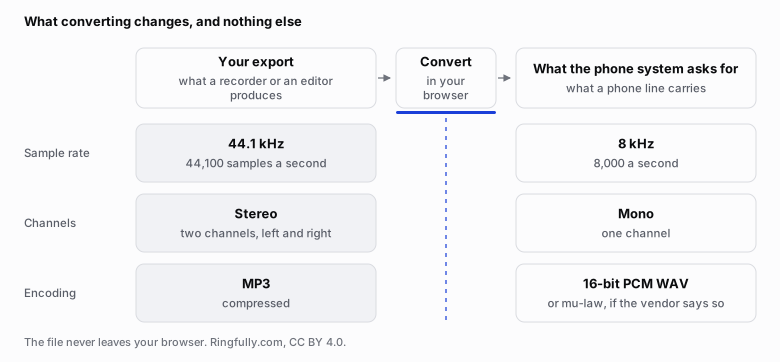
Three numbers separate the file you exported from the file the phone system will take. The conversion changes those and nothing else.
Reuse this figure anywhere, including commercially, with credit to Ringfully and a link back to this page. CC BY 4.0.
Two practical consequences. Pick hold music that is simple to begin with: a solo instrument or a small arrangement loses less than a full mix. And write the greeting for the band it will be heard in: short sentences, no background music under the voice, since the music competes with the consonants once everything above 4 kHz is gone.
How do I convert it in my browser?
The telephone audio converter is a page on this site that does the conversion inside your browser, on your own computer. There is no account and nothing is uploaded: the file never leaves your browser, and the download you get is written by the browser itself.
- Drop the file on the page, or pick it. An MP3, a WAV, a voice memo, whatever your recorder produced.
- Pick the preset for your system. The default is 8 kHz, mono, 16-bit PCM WAV, which is what most upload pages ask for. If your vendor's help article names mu-law, A-law or 16 kHz, pick that one instead.
- Press Analyse. It reads the file and tells you what it is now: the sample rate, the channel count and the length, so you can see the mismatch before you fix it.
- Press Convert, then download. Listen to the result once before you upload it. It will sound like a phone call. It should not sound worse than one.
If the upload still fails after that, the vendor wanted something other than the default, and the last section covers the usual variants.
What should I check before I upload?
The conversion fixes the format. Four things it cannot fix are worth a minute each.
- Clipping. A recording made too loud has flattened peaks that sound crackly, and no conversion undoes them. Lower the level at the source and export again.
- Silence at the start. A second of nothing before "thank you for calling" makes callers think the line is dead, and some of them hang up. Trim it to almost nothing.
- Length. A greeting should reach the options in a few seconds. Hold music is a loop, and a loop of one to three minutes is enough; nobody notices the join. Most systems also cap the length of a file, and the cap is in the vendor's help article.
- Level. A stereo track summed to mono is often quieter than it was. If the converted file is noticeably softer than a voice would be, raise the level in your editor and convert again, stopping well short of clipping.
Then listen on a phone speaker if you can. It is closer to what the caller will hear than headphones are.
What if the vendor wants something else?
Three variants come up often enough to name.
Mu-law WAV. The same 8 kHz mono audio, but each sample stored as 8-bit mu-law, which is the encoding the North American phone network itself uses (G.711). A-law is the European twin. Both are presets in the converter; the file is smaller, and it is exactly what the network would have turned your PCM into anyway.
Headerless files. Some systems, particularly ones built on Asterisk, want the samples with no header at all, with a file extension such as .ulaw, .alaw or .sln naming what is inside. If the converter offers a raw export for your preset, use it; if not, the header is the only thing the vendor's tool strips, and their help article says how.
16 kHz. A few newer systems accept wideband audio, which keeps frequencies up to 8 kHz and sounds noticeably better on a call that supports it. Only use it when the vendor says so: a 16 kHz file uploaded to an 8 kHz system is refused, or resampled down and nothing gained.
When you do not know which, search for the vendor's name and "greeting audio format". The answer is almost always a support article, and it names one of the four presets above.
Once the file uploads, the rest is the menu itself: which step plays it, and pressing publish so the new recording goes live without cutting off anybody already on the line. If it is the menu rather than the file that is fighting you, tell us what it does and we will say honestly whether it is something we fix.
The converter runs entirely in your browser and keeps nothing. Figures on this page are CC BY 4.0. The format list and the transcoding statement are quoted from Twilio's documentation for the Play verb, linked above, as it read on 2026-09-06.
Questions people ask
- What audio format does a phone system want for a greeting?
- Most ask for a WAV file at 8 kHz, one channel, 16-bit PCM. Some want the same 8 kHz mono audio stored as mu-law (or A-law outside North America), and a few accept 16 kHz. The upload page or the vendor's help article says which. When it says nothing, 8 kHz 16-bit mono WAV is the safe first try.
- Why is my MP3 rejected when it plays fine on my computer?
- Because playing and uploading are different tests. Your computer decodes almost anything. The phone system reads the file's header and compares three numbers against a short list: the container, the sample rate and the channel count. A 44.1 kHz stereo MP3 from a voice recorder or an editor misses on all three. Converting it is the fix, not re-recording.
- Will the greeting sound worse at 8 kHz mono?
- It will sound like a phone call, because that is what a phone line carries. Everything above about 4 kHz is dropped, which is why hold music loses its shimmer and why speech still comes through clearly. Converting it yourself from a good source sounds better than letting the system squash it at upload, and it lets you listen before a caller does.
- How do I convert a greeting without installing anything?
- Use a converter that runs in the browser, so the recording never leaves your machine. Ours is at /tools/phone-audio-converter: choose the file, pick your phone system from the list, and it reports what the file already is, what it changed, and anything worth fixing before you upload, such as clipping or a long silence before the first word. It carries a preset for each system with a link to the vendor page it came from.
