Blog
Does VoIP work without internet?
No, and here is what to arrange instead: where calls go when the connection dies, why it has to be set at the provider, and what a cellular backup buys.
John · Owner and CEO · 6 min read ·
No. A cloud phone system carries the audio over your internet connection, so when the connection dies the desk phones cannot place or answer anything. Your number is unaffected, because it lives in the provider's network rather than in your building. The useful question is where calls should go instead, and that has to be arranged in advance.
Everything below is about that arrangement: what happens by default, why it is worse than people expect, and the three things you can do about it in ascending order of cost.
What actually stops, and what does not
Three separate things are usually blurred together.
Your phones stop. A handset on your desk or a browser tab on a laptop needs the connection to reach the provider. No connection, no calls in either direction. There is no partial mode.
Your number does not stop. It is a record in a carrier's network pointing at your provider. Somebody dialling it gets exactly as far as they always did. The failure is in the last step, the delivery to you.
Your voicemail does not stop, if it is your provider's voicemail rather than something running on a box in your office. Messages keep arriving and are waiting when you come back.
So an outage is not "the phone is dead". It is "calls reach the front door and nobody opens it", and that distinction is what makes a fix possible. It follows directly from where the switching sits, which is the subject of what VoIP is and how it works.
For the minute by minute version, including what the caller hears at each stage and why nothing notices immediately, see what happens when your internet drops.
Why your provider keeps trying phones that are gone
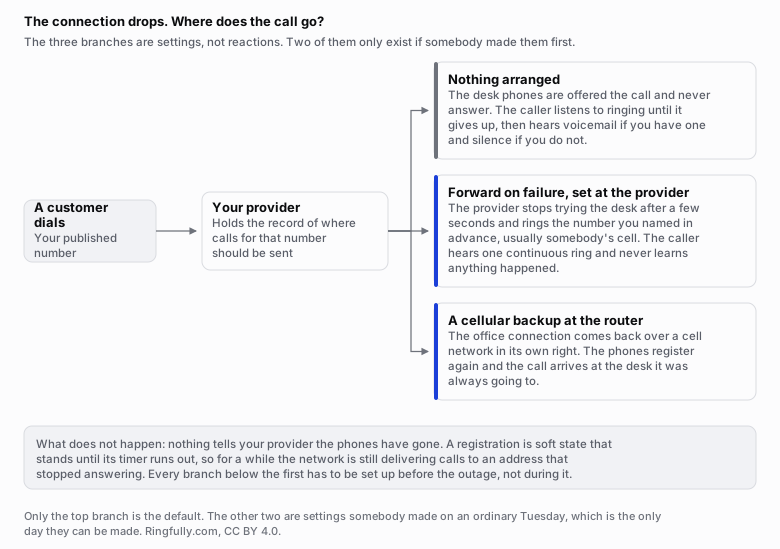
Only the first branch is the default. The other two are settings somebody made on an ordinary day.
Reuse this figure anywhere, including commercially, with credit to Ringfully and a link back to this page. CC BY 4.0.
A phone tells the network where it is by registering, and the registration is not permanent. RFC 3261, the specification for SIP, puts it plainly in section 10.2.2: registrations are soft state and expire unless refreshed. The phone re-announces itself on a timer, and in between, the record simply stands.
That has a consequence people find surprising. When the connection drops, nothing sends a message saying so. The phone is not able to, because the thing that broke is the path a message would take. So for the rest of that interval the provider holds a record that looks perfectly live, and calls are offered to an address that stopped answering some time ago.
The gap is usually seconds to a couple of minutes, not hours. It is still the reason the rule about what to do instead has to live at the provider rather than on the phone. Anything configured on the phone dies with the phone.
Option one: a forward on failure, which costs nothing
This is the setting most small businesses should have and most do not have. It says: if the desk phones do not answer within a few seconds, ring this other number instead, usually somebody's cell phone.
It is configured once, at the provider, on an ordinary day. It does not need anybody to notice the outage, sign in or press anything, which is the whole point, because during an outage nobody can sign in to anything.
From the caller's side, nothing happened. They hear one continuous ring and somebody picks up.
Two things to get right when you set it up:
- Point it at a number, not at a person's availability. A forward to somebody's cell at three in the afternoon is fine. A forward to somebody's cell at ten at night is a call that wakes them up, so pair it with your hours. The three usual shapes are covered in after-hours call handling.
- Test it by pulling the cable. Not by imagining it. Unplug the office router, call the main number from a cell phone, and see what happens. Ten minutes, once a year.
Option two: a cellular backup at the router
A router with a cell connection in it fails over automatically when the main line drops, and the phones register again over the cell network. This is the only option that keeps the desk phones themselves working, which matters if people are wearing headsets and running a queue rather than answering the occasional call.
What it buys is narrower than the brochure suggests, and it is worth being exact:
- It does not survive a power cut. The router needs electricity. Pair it with an uninterruptible power supply under the desk holding the router, the switch and one phone, or accept that a blackout takes the phones out anyway.
- It has to have room for your calls. A cell backup that carries email fine can still struggle with several conversations at once, because voice needs a steady trickle rather than a large total. Working out how much room your calls need is arithmetic rather than a guess, and it is done in how much bandwidth VoIP needs.
- Failover is not instant. Calls that were up when the line dropped will drop with it. New calls work.
Option three: a second connection, and when it is worth it
A separate line from a different provider, ideally arriving by a different physical route, is the real answer to an outage and it costs what a second connection costs every month whether or not anything happens.
The test is simple arithmetic rather than a judgement about risk appetite: what does one hour of nobody answering the phone cost your business, and how many hours a year do you actually lose? If the answer to the first is large and the second is more than about one, the second connection pays. If your calls are bookings that will be made again tomorrow, it does not, and the money is better spent on the forward and the battery.
What to write down before the next outage
Four lines, on paper, where somebody can find them when the internet is not available to look anything up:
- Where calls go if the desk does not answer, and who is expected to answer there.
- Who can change that, and the phone number to reach them on. Not an email address.
- The provider's support number, and the account details they will ask for.
- The date you last tested it by pulling the cable.
Most businesses that handle an outage well are not the ones with redundant connections. They are the ones where the caller heard one ring and somebody said hello.
What we do not do
We do not supply internet connections, routers, cell backup hardware or batteries, and we have no office anywhere to send an engineer from. We cannot make a call arrive at a phone that has no way to reach the network. What we can do is decide, in advance, where a call goes when your desk does not answer, and set that up with you by hand.
The rest of the groundwork is on the VoIP basics topic page. If you want that failover arranged and tested, talk to us.
Questions people ask
- Does VoIP work without internet?
- No. A cloud phone system carries audio over your internet connection, so when the connection is gone the desk phones cannot place or receive a call. What can still happen is that calls to your number are answered somewhere else, because your number lives in the provider's network rather than in your building. That redirection has to be configured before the outage, not during it.
- What happens to incoming calls when my internet goes down?
- They still arrive at your provider, which then tries to deliver them to phones that are no longer answering. With nothing configured, the caller hears ringing until it times out and then gets voicemail or nothing. With a forward on failure set in advance, the provider gives up on the desk after a few seconds and rings a cell phone instead, and the caller hears one continuous ring.
- Why does my provider keep sending calls to a phone that is offline?
- Because nothing told it the phone had gone. A phone announces itself to the network on a timer and that registration stands until it expires, so a connection that dies between refreshes leaves a record that looks live. The gap is usually seconds to minutes rather than hours, but it is why the failover rule has to live at the provider and not on the phone.
- Does a cellular backup router keep my phones working?
- It can, and it is the only option that keeps the desk phones themselves working. The router fails over to a cell connection, the phones register again over it, and calls arrive where they always did. What it does not fix is a power cut, since the router still needs electricity, and it is worth knowing whether the backup connection has enough room for the number of calls you actually make at once.
- Do I need two internet connections for a phone system?
- Most small businesses do not. A second connection is worth its monthly cost when calls are the business and an hour of silence costs more than a year of the backup. Below that, a forward on failure to a cell phone costs nothing and covers the same outage for the caller, which is the only person whose experience actually matters.
About the author
John
Owner and CEO
Owner and CEO with over 10 years of experience in the IT industry, including more than 5 years specializing in VoIP and cloud communications. Experienced in designing, deploying, and supporting reliable communication solutions for businesses.

Keep reading
If you are working out whether VoIP suits your team, tell us how many people answer the phone and what your connection is like, and we will say plainly whether it fits.