Blog
How a VoIP call actually travels
Setting a call up and carrying its audio are two different conversations. What a packet crossing the internet does to speech, and why latency is the number.
John · Owner and CEO · 5 min read ·
A VoIP call is two conversations, not one. Signalling sets the call up, rings the far end and tears it down at the end. The audio travels separately, as a stream of small packets, along a path the two conversations negotiated. They do not have to take the same route, and that fact explains most of what goes wrong.
Two conversations
The setup conversation is usually SIP, the Session Initiation Protocol, defined in RFC 3261. It carries the intent: this caller wants to reach that number, here is where I can receive audio, the far end is ringing, the far end answered, somebody hung up. It goes through your provider, because your provider is the party that knows how to reach the number you dialled.
The audio conversation is RTP. It carries nothing but sound and the sequencing needed to reassemble it, and it goes wherever the setup conversation agreed the two ends can reach each other. Sometimes that is straight across the internet between two offices. Sometimes it is through a server in the middle because a firewall makes anything else impossible.
This split is the reason for the most common VoIP fault in the world: the call rings, somebody answers, and neither side can hear anything. Ringing is a receipt for the first path. Sound is a receipt for the second. When you get one and not the other, you already know which half broke, and it is not the phone system.
What happens to one second of speech
Take a common setup, G.711 audio in 20 millisecond packets.
Your voice is sampled and coded continuously. Every 20 milliseconds the phone takes what it has, 160 bytes of audio, wraps it in headers that say what it is and where it sits in the sequence, and sends it. That is 50 packets a second in each direction, running the whole time anyone is talking, and continuing through the pauses on most setups.
None of those packets know about each other. Each is routed independently, and the network makes no promise about how long any of them takes or whether it arrives at all. The receiving end has to build a smooth, continuous sound out of a stream of independent arrivals, and that is the entire engineering problem.
Note that the packet count, not the audio, drives what the call costs on your connection: the headers are charged per packet. How much bandwidth does VoIP need works that arithmetic out properly.
The three numbers that decide a call
Capacity is almost never the answer. These three are.
Latency, the one-way time from mouth to ear. It accumulates: coding the audio, waiting to fill a packet, crossing the network, sitting in a buffer at the far end, decoding. Every stage adds, and none of them give anything back.
Jitter, the variation in that time. Packets sent 20 milliseconds apart do not arrive 20 milliseconds apart, because each took its own route through its own queues.
Loss, packets that never arrive or arrive too late to be useful, which is the same thing. A late packet is worse than a missing one, because its moment has passed.
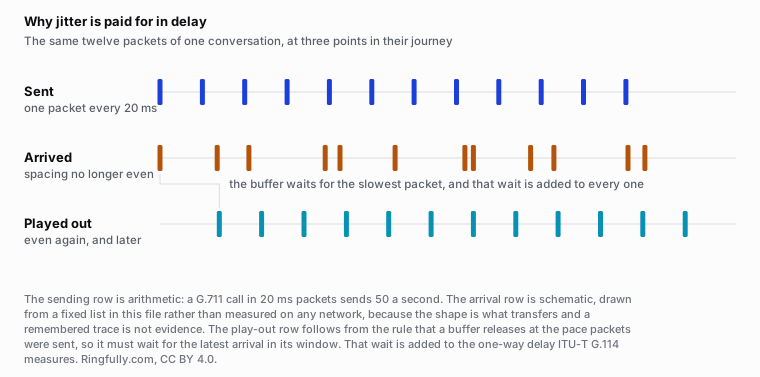
The buffer straightens the arrivals out again. The cost of doing so is delay, which is why jitter shows up as latency.
Reuse this figure anywhere, including commercially, with credit to Ringfully and a link back to this page. CC BY 4.0.
The figure is the part worth carrying away. The receiver cannot play packets out as they land, because uneven playback is unlistenable. So it holds them in a buffer and releases them at the pace they were sent. The buffer has to be deep enough to cover the spread of arrivals, and every millisecond of depth is a millisecond added to the delay. Jitter does not have its own symptom. It spends itself as latency, or, when the buffer is not deep enough, as gaps.
Why 150 milliseconds is the line
The published threshold is ITU-T Recommendation G.114, on one-way transmission time. Its bands:
- Under 150 ms. Essentially transparent. Most people never notice, and interrupt each other normally, which is what a conversation is.
- 150 to 400 ms. Usable, and increasingly awkward as it climbs. This is where both people start talking at once and then both stop.
- Above 400 ms. Outside what the Recommendation considers acceptable for general network planning. The conversation stops being one and becomes an exchange of statements.
Two things about those numbers. They are one-way, so the delay you experience as an awkward pause is roughly double the figure. And the Recommendation assumes echo control is already in place, which means the tolerances would be tighter without it.
That is also why a video meeting with a visible half-second lag feels rude while the same delay on a recorded message is invisible. The threshold is a property of turn-taking, not of audio.
When the connection drops
There is no clever answer. Calls in progress end, and no new ones arrive at that building, because the thing that carries them is the thing that failed. An old copper line drew power from the exchange and survived a blackout; this does not.
What is available is deciding in advance what happens instead. Calls can land on voicemail, on a cell phone, or on a message that says the office is unreachable and when to try again. That decision costs nothing and takes ten minutes, and the businesses that have made it are the ones that do not lose a day of calls to an outage. The same thinking applies to the hours nobody is there at all, which after-hours call handling sets out as three options rather than one.
What is worth doing
- Put the phones on a cable. Wi-Fi adds jitter, and it is the cheapest variable to remove from the argument.
- Measure the right thing. A speed test tells you about capacity on one path at one minute. If you want to know whether calls will be comfortable, you need delay and its variation, at your busy hour.
- Stop diagnosing from the symptom. "The phones are bad" covers at least four unrelated failures. Ringing without audio, choppy audio, one-way audio and calls that drop after exactly the same interval each time have four different causes and four different owners.
If your calls sound wrong and you have got this far without finding it, tell us what you are hearing and we will tell you which of the four it looks like. The rest of the mechanism, including where the whole thing sits in a business, is in VoIP basics and in what VoIP is and how it works.
Questions people ask
- How does a VoIP call actually get from one phone to another?
- In two separate conversations. Signalling, usually SIP, goes through your provider and negotiates who is calling whom and where the audio should be sent. The audio itself then travels as a stream of small packets, fifty a second on a common setup, along whatever path the two ends agreed on. The two do not have to take the same route, and often do not.
- Why does a call ring but have no sound?
- Because the first conversation succeeded and the second did not. Ringing proves the signalling path works. Silence proves the audio path does not, and the cause is almost always a firewall or an address translation blocking the media, not the phone system. It is the single most diagnostic symptom in VoIP.
- What is an acceptable latency for a VoIP call?
- ITU-T Recommendation G.114 puts one-way transmission time under 150 milliseconds in the range where most people never notice a delay, 150 to 400 milliseconds in a band that is usable and increasingly awkward, and above 400 milliseconds outside what it considers acceptable for general planning. The Recommendation assumes echo control is already in place.
- What is jitter, and why does it matter more than it sounds?
- Jitter is variation in how long packets take to arrive. Voice is sent at an even pace and has to be played back at an even pace, so the receiver holds packets briefly in a buffer and releases them evenly. That buffer has to be deep enough to cover the spread, and whatever depth it uses is added to the delay. Jitter therefore costs you latency even when nothing is lost.
- What happens to VoIP calls when the internet goes down?
- Calls in progress end and no new ones reach that location. Nothing on your premises can fix this, because the connection is the thing that failed. What can be decided in advance is where calls go instead: to voicemail, to a cell phone, or to a recorded message that tells people what is happening.
- Is a speed test enough to know if my connection can carry calls?
- No. A speed test measures capacity on the path it took, on the device it ran on, at the minute it ran. It does not measure how steadily packets arrive or how far they travel, and those are what decide whether a conversation is comfortable. A connection with plenty of capacity can still produce calls that break up.
About the author
John
Owner and CEO
Owner and CEO with over 10 years of experience in the IT industry, including more than 5 years specializing in VoIP and cloud communications. Experienced in designing, deploying, and supporting reliable communication solutions for businesses.

Keep reading
If you are working out whether VoIP suits your team, tell us how many people answer the phone and what your connection is like, and we will say plainly whether it fits.