Blog
What happens when your internet drops
The call goes silent and nothing is told. What a phone system can and cannot do about an outage, how forward on failure works, and what to arrange beforehand.
John · Owner and CEO · 7 min read ·
The call you are on goes silent and neither end is told. The system upstream keeps sending new calls to a device that is not there until your registration lapses, which is a setting rather than a fact. What you can do about it is all arranged before the outage, not during it.
The call you are already on
Audio and signalling are separate streams travelling separately. That single fact explains everything that follows, and it is the same split described in what SIP trunking is, where the signalling protocol and the channels carrying the audio are pulled apart.
When the link dies, the audio packets stop. Nothing announces this: there is no message saying "the other end has gone away", because there is nobody left able to send one. Both sides are holding a call that no longer has any media in it.
What happens next, in order:
- Silence, both ways. The call is still formally up. Everyone involved believes it exists.
- The caller hangs up. Usually within a few seconds, and usually assuming the fault is theirs.
- The far end gives up. Either its media timer notices that no audio has arrived for some tens of seconds, or a session refresh goes unanswered. The refresh mechanism is defined in RFC 4028, which sets a floor of ninety seconds on how often a session may be checked; in practice systems run it far longer than that, so the media timer is usually what ends the call.
The gap between step 1 and step 3 is the whole problem in miniature. Your side knows immediately. Nothing else does.
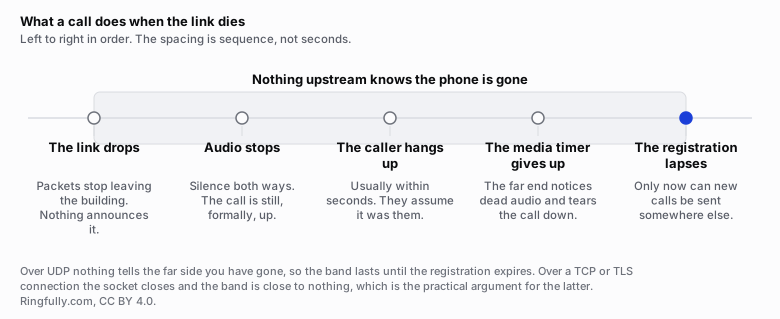
The shaded band is the gap between your outage and the system knowing about it.
Reuse this figure anywhere, including commercially, with credit to Ringfully and a link back to this page. CC BY 4.0.
Why nothing notices straight away
A phone or an app tells the system where it is by registering, and re-registering before the last one expires. That is the only signal the platform has about whether you exist.
So the length of your blind spot depends on how the device was connected:
- Over UDP, nothing tells the far side you have gone. There is no connection to break. The platform keeps believing the registration until it expires on its own schedule, and that schedule is a setting somebody chose.
- Over TCP or TLS, there is a real connection, and when the link dies the connection closes. The platform can know almost immediately.
That is a concrete, operational argument for a connection-oriented transport that has nothing to do with privacy, and it is rarely the one people give.
Calls that arrive during the outage
Here is where the blind spot turns into a customer experience.
While the platform still believes you are there, it does what it always does: it rings your device. Nobody answers, because nobody can. The caller listens to ringing for the length of the no-answer timeout, and only then does anything else happen. If that timeout is twenty-five seconds, every caller during that window waits twenty-five seconds before reaching voicemail or a fallback.
Once the registration has lapsed, the platform knows the device is unreachable and applies the fallback straight away. The caller does not wait.
So the two numbers that decide what an outage feels like to your customers are the registration interval and the no-answer timeout. Find out what both of yours are. Most people have never asked, and it is a two-line question to a provider.
Forward on failure, and what it actually does
Forward on failure is a destination the platform uses when it cannot reach the primary one. The important detail is where it lives: on the number, at the platform, not on your device. That is what makes it survive the thing that broke. A forwarding rule configured on a device that is offline is a rule nobody can read.
What it does not do is escape physics. The fallback still has to be reachable by some other path:
- A mobile number works, because the call goes out over the mobile network and never touches your office.
- Voicemail works, because it lives on the platform.
- Another desk in the same building does not work. It is behind the same dead link.
- A number that forwards back to the same system does not work, and this happens more often than it should, usually because somebody set it up during a reorganisation and nobody drew the diagram.
Test it the only way it can honestly be tested: unplug the connection and call your own main number from a cell phone. Do it once, deliberately, at a quiet moment. Nothing else tells you whether it is really set up.
The four things to arrange in advance
All of this is preparation. None of it can be done during an outage, because during an outage you cannot reach the thing that needs changing.
This is the checklist version. Does VoIP work without internet compares the three arrangements against each other, including what each one costs and when a second connection stops being worth it.
- A fallback destination on every number that matters. A mobile number for the main line, voicemail for the rest. Write down which number goes where and check it once a year.
- A way to change the routing from outside the building. From a phone on mobile data, in a browser. Know the login, know who else has it, and confirm that person is not on holiday. A phone system you can only administer from the office is a phone system you cannot administer during an outage.
- A message you can switch on. Recorded in advance, saying what is happening and what a caller should do. A short honest message beats ringing forever. Six phone messages every business needs has the set worth recording before you need any of them.
- A second path, if calls genuinely matter. A router that fails over to a cellular connection. Size it against your busiest moment rather than your average, because that is where it will be tested; how much bandwidth VoIP needs has the arithmetic. And note that it does nothing at all in a power cut unless the router and the computers are on battery too.
What a phone system cannot do about it
Worth stating plainly, because this is where vendors get vague.
It cannot deliver audio over a link that is not there. No amount of clever routing recovers a call whose packets have nowhere to go.
It cannot know your internet is down. It can only observe that your device stopped answering, which is a different and slower thing, and is the entire reason the blind spot exists.
It cannot run a computer without power. A connection that survives a power cut is not much use if the machines answering the calls do not.
And with the connection gone, a phone that works over that connection cannot place any call at all, including a call for help. That is the reason every workplace should keep at least one mobile phone that does not depend on the office network, and the reason everyone should know where it is.
More on this topic in SIP and networks. Related: what missed calls are actually worth is the number that tells you how much of the above is worth doing.
What this looks like with us
Ringfully runs in a browser tab or in the Windows desktop application, so an internet outage takes the phone with everything else in the office. We are not going to pretend otherwise, and we do not sell a box that keeps switching calls in your closet when the link dies.
What we do is the part that can be arranged in advance: a fallback destination on your numbers, a message you can switch on, and administration that works from any connection rather than only from your desk. Numbers are provisioned and routed by hand here, which means the fallback is something a person sets up with you rather than a field you hope you filled in correctly.
If you have never tested what happens when the link goes, ask us to walk through it with you before the day it matters.
Questions people ask
- What happens to a VoIP call when the internet goes down?
- The audio stops immediately and neither end is told, because the audio and the signalling travel separately. The caller hears silence and usually hangs up within a few seconds. The far end tears the call down when its media timer expires or when a session refresh goes unanswered, which takes considerably longer than the caller's patience.
- Do incoming calls still reach me if my internet is out?
- Only if the system has stopped believing your device is there. Until your registration lapses, the platform rings a device that cannot answer and the caller waits out the no-answer timer before anything else happens. Once it lapses, a fallback destination takes over immediately. The two numbers that decide your experience are the registration interval and the no-answer timeout.
- What is forward on failure?
- A destination the platform uses when it cannot reach the primary one. It is set on the number rather than on the device, so it survives the thing that broke. It only helps if the fallback is reachable by some other path, which in practice means a mobile number or voicemail, never another desk in the same building.
- Can I still call 911 if my internet is down?
- Not from a phone that works over that internet connection. When the connection is gone, the device cannot place any call at all. Every workplace should keep at least one mobile phone that does not depend on the office network, and everyone should know where it is.
- Does a cellular backup router fix this?
- It fixes the part that is about connectivity. Calls will carry over a mobile connection, though the capacity and the steadiness of that connection decide how they sound. Size it against your busiest moment, test it deliberately rather than assuming, and know that it does nothing about a power cut unless the router and the computers are also on battery.
About the author
John
Owner and CEO
Owner and CEO with over 10 years of experience in the IT industry, including more than 5 years specializing in VoIP and cloud communications. Experienced in designing, deploying, and supporting reliable communication solutions for businesses.

Keep reading
If calls drop, go one-way or break up on your network, tell us what connection and router you have, and we will say where we would look first.