Blog
SIP ALG: why to turn it off
SIP ALG rewrites the addresses inside your call setup, and it usually gets some of them wrong. What it does, what it breaks, and where the setting hides.
John · Owner and CEO · 7 min read ·
Turn it off. SIP ALG is a router feature that rewrites the addresses inside your call-setup messages, and most implementations rewrite some of them and miss others, which leaves the message describing two different networks at once. The result is phones that register and then stop, and calls with audio in only one direction.
That is the conclusion first, because it is almost always the right one. The rest of this is why, which matters when somebody tells you to leave it on. The protocol the feature is meddling with, and the product sold on top of it, are covered in what SIP trunking is. It is one of the recurring subjects in SIP and networks.
The problem it was invented to solve
Your phone sits on a private address. The internet does not know that address exists. Your router translates between the two, and for ordinary traffic that is invisible: a web request goes out, the reply comes back to the router, and the router remembers which machine inside asked.
Call setup breaks that pattern in one specific way. The messages carry addresses inside them, as content, not just in the packet headers. A phone announces, in the body of the message, "send my audio to 192.168.1.50, port 16400". Translate the headers and leave the body alone, and the far end has been handed an address it cannot reach.
So somebody had the idea of teaching the router to read the message and fix the addresses inside it. That is an Application Layer Gateway, and applying one to SIP is a SIP ALG.
It is a reasonable idea. It is also the idea the people who wrote the standards asked applications not to rely on. RFC 3235, the guidance on designing applications that work through address translation, is blunt about it: making a protocol work this way "presupposes every NAT device can be updated in a timely fashion to support a new protocol. Since this is unlikely, application writers are urged to avoid placing addressing information in payloads all together." It also notes that an ALG may be "difficult or easy to construct, though in some cases it may not be possible at all."
Every router in the world running a SIP ALG is a small piece of evidence for that warning.
What actually goes wrong
Not that the router rewrites the message. That it rewrites part of it.
A call setup carries addresses in several places, and they have to agree. The Via header says where to send replies. The Contact header says where to send later requests in this conversation. Inside the message body, a c= line names the host that should receive the audio and an m= line names the port. And a Content-Length header states how many bytes that body is.
Rewriting a private address to a public one makes the body a different length. A device that changes the body and leaves the declared length alone has produced a message that contradicts itself, and what happens next depends entirely on how strictly the far end reads it.
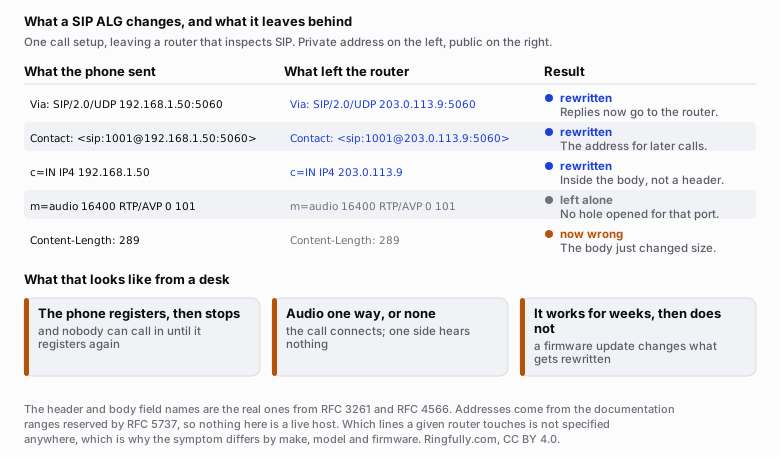
The failure is not that the router rewrites the message. It is that it rewrites some of it and leaves the rest describing a network that no longer exists.
Reuse this figure anywhere, including commercially, with credit to Ringfully and a link back to this page. CC BY 4.0.
Grandstream's own documentation for its gateway products describes the mechanism plainly: a SIP ALG exists to "modify the IP addresses and ports in the SIP messages, to account for the fact that many SIP deployments use Network Address Translation", and to "create a pinhole to allow RTP traffic to flow dynamically". It also notes where the trouble concentrates: in most cases "the issue is with the Media Session", when the values inside the body are not adjusted correctly. You can read the whole note in the GWN Application Layer Gateway guide.
The header and body field names above are the real ones, from RFC 3261 and RFC 4566. What no specification says is which of them a given router will touch, which is why the same setting produces a different symptom on every make, model and firmware version.
How to recognise it from a desk
You do not need a packet capture to suspect an ALG. Three patterns are characteristic.
A phone that registers and then goes quiet. Registration succeeds. Outbound calls work all day. Inbound calls stop arriving after a while, then start again on their own. The Contact address the provider was given no longer routes back to the phone, and the next registration temporarily repairs it. Registrations default to an hour under RFC 3261, which is roughly the period people describe.
Audio in one direction only. The call connects, both ends show connected, and one side hears nothing. The signalling got through and the audio did not, because the addresses describing where to send it were rewritten inconsistently. Network settings that break VoIP audio covers the whole family of causes; the ALG is the one you can eliminate in thirty seconds.
Calls that drop at a consistent time. Thirty seconds, or some other number that is the same every time, is a message the far end sent and your phone never received, or a reply your phone sent that never got back.
None of these prove it is the ALG. All of them are worth spending one setting change to rule out. What none of them are is a capacity problem: if the phones sound thin or choppy rather than silent, that is a different investigation, and how much bandwidth does VoIP need is where it starts.
Where the setting lives
Router interfaces differ too much for a menu path to be worth printing, and a path copied from the wrong firmware version wastes more time than it saves. What is stable is the class of setting and the words used for it.
Look for any of these labels:
| What it may be called | Where that class of setting usually lives |
|---|---|
| SIP ALG | Firewall, or a NAT or ALG subsection under it |
| SIP Transformations | Under the WAN interface or the security policy |
| SIP Helper | Under NAT or under a protocol helpers list |
| Application Layer Gateway | A security page listing several protocols with a checkbox each |
| VoIP passthrough | Sometimes under NAT, sometimes on a dedicated VoIP page |
Two things worth knowing before you start clicking. On some firmware the setting is a per-protocol list, and SIP is one row among FTP, TFTP and others, so a page-level search for the word "SIP" finds nothing. And on a small number of consumer routers, the option is not exposed in the interface at all, in which case the choices are to ask your internet provider to turn it off on their side, to put their box in bridge mode behind your own router, or to move your phones onto an encrypted transport, which the ALG cannot read and therefore leaves alone.
Change one thing, reboot the phones so they re-register cleanly, and test both directions of audio on an inbound call and an outbound one. Changing three settings at once and then testing tells you nothing about which one mattered.
What replaced it
The reason turning it off is safe is that the problem it addresses was solved properly, in the endpoints and the provider's equipment, by people who could see the whole message rather than a slice of it passing through.
A phone that keeps its registration alive with small periodic messages holds the router's mapping open without anybody rewriting anything. A provider that sends audio back to wherever your audio came from, rather than to the address written in the message, does not care what your private address says. Both mechanisms work with an unmodified message and stop working when a middlebox edits one.
Which is the real argument. An ALG is not adding a capability. It is intercepting a problem that both ends had already agreed how to handle, and handling it worse.
What to do next
- Turn it off. Then reboot the phones, and test an inbound call, an outbound call, and a transfer.
- If the symptom persists, you have removed a variable, not wasted an afternoon. Work down the rest of the list: mapping timeouts, two routers in series, and the direction the audio is missing in.
- If your router will not let you, that is a fact about the router worth knowing before you buy phones. It is also worth raising with whoever supplied it.
If you have run out of things to try, tell us what the phones are doing and what changes when you make a call. The direction the audio is missing in, and whether the problem survives a reboot, narrow it down faster than any list can.
Questions people ask
- What does SIP ALG actually do?
- It is a feature in a router that reads the inside of your call-setup messages and rewrites the network addresses it finds there, so that a private address on your desk becomes the public address of your connection. The intention is to spare you from configuring anything. The problem is that it has to rewrite every address consistently, in a message format it may not fully understand, and most implementations rewrite some and miss others.
- Should I turn SIP ALG off?
- In almost every case, yes. Modern phones and modern providers already solve the address problem themselves, in ways that do not require a middlebox guessing at the contents of a message. Turn it off first, before spending an afternoon on anything else, because it is free to try and it is the single most common cause of phones that register and then stop.
- What are the symptoms of SIP ALG being on?
- The classic three are a phone that registers and then goes unreachable until it registers again, a call that connects with audio in only one direction, and calls that drop after roughly the same number of seconds every time. A fourth is worse: everything works for weeks and then a router firmware update changes which lines get rewritten.
- What is the setting called on my router?
- It has at least four common names. SIP ALG, SIP Transformations, SIP Helper, and Application Layer Gateway with SIP as one of the protocols listed under it. Some firmware calls it VoIP passthrough, and confusingly, on that firmware turning passthrough on may be what disables the rewriting. Read the description beside the checkbox, not just the label.
- Is it safe to disable SIP ALG?
- Yes. It is not a security feature and it does not protect anything. It is an address-rewriting convenience, and disabling it returns the router to doing what it does for every other kind of traffic. If calls stop working after you disable it, the cause is elsewhere and you have just removed a variable, which is progress.
- What if my router has no way to turn it off?
- Some consumer routers, particularly ones supplied by an internet provider, do not expose the setting at all. The usual answers are to ask the provider to disable it, to put the provider's box into bridge mode and use your own router behind it, or to have your phones use an encrypted transport, which an ALG cannot read and therefore cannot rewrite.
About the author
John
Owner and CEO
Owner and CEO with over 10 years of experience in the IT industry, including more than 5 years specializing in VoIP and cloud communications. Experienced in designing, deploying, and supporting reliable communication solutions for businesses.

Keep reading
If calls drop, go one-way or break up on your network, tell us what connection and router you have, and we will say where we would look first.