Blog
Network settings that break VoIP audio
One-way audio has a direction, and the direction names the fault. NAT timeouts, symmetric RTP, double NAT and QoS, in the order worth checking them.
John · Owner and CEO · 7 min read ·
One-way audio happens because a phone call is three conversations, not one, and only one of them needs your router to accept unsolicited traffic. Setting the call up and sending your voice are both outbound, so they work. Their voice coming back is inbound, and that is the track that gets dropped in silence.
Which direction is missing tells you where to look, and that is the most useful diagnostic in the whole subject. The rest of this works through the settings that cause it, in the order worth checking them. For the layer underneath, how calls reach the public network at all, what SIP trunking is is the starting point. It sits alongside the other troubleshooting pieces in SIP and networks.
Why the failure has a direction
Setting a call up is a request your phone made. Your router remembers that it went out and lets the answer back, exactly as it does for a web page.
Sending your voice is also outbound, and it has a useful side effect: the first packet out opens a mapping in the router, a note saying that replies to this address and port belong to that phone inside.
Receiving their voice is the odd one out. It is a stream from a machine your phone never contacted, arriving at a port nothing inside asked about, and whether it gets in depends entirely on whether it matches a mapping that already exists.
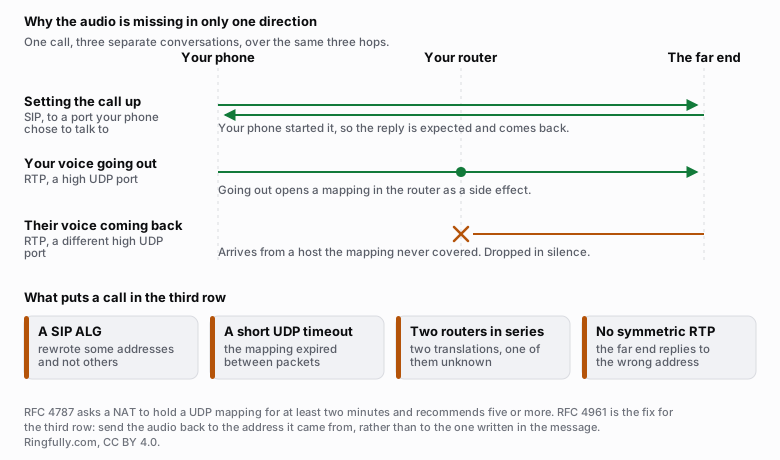
One call, three separate conversations. Only one of them asks your router to accept traffic nobody inside asked for, and it is the one that goes missing.
Reuse this figure anywhere, including commercially, with credit to Ringfully and a link back to this page. CC BY 4.0.
Two standards describe the two halves of that. Audio itself is carried by RTP, specified in RFC 3550, as two independent one-way streams rather than one two-way connection. And the behaviour a router should have when translating those streams is set out in RFC 4787, which requires that "a NAT UDP mapping timer MUST NOT expire in less than two minutes" and recommends "a default value of five minutes or more".
Everything below is a way of breaking one of those two things.
The mapping that expires
The commonest cause, and the least dramatic to look at.
A mapping is only kept while it looks in use. RFC 4787 sets the floor at two minutes for good reason: a phone that has registered and is waiting for a call may send nothing for a long time, and if the mapping is gone when a call arrives, the provider is sending to a door that closed.
The symptom is characteristic. Outbound calls work perfectly, all day, forever. Inbound calls arrive sometimes and not others, and they reliably arrive right after somebody has made an outbound call, because that reopened the mapping.
Two fixes, and you want both. Set the router's UDP timeout to something that respects the standard, minutes rather than seconds. And make sure the phones are sending keep-alives frequently enough to outlast whatever the router is actually doing, which is a phone setting and usually a field marked keep-alive interval or NAT interval.
Audio sent to the wrong address
The second cause, and the one people find hardest to believe.
The address inside a call-setup message says where to send the audio. If the phone wrote its private address there, that address is meaningless on the internet, and audio sent to it goes nowhere.
The clean solution is for the far end to ignore the written address and send audio back to wherever your audio actually came from. That behaviour has a name and a specification: RFC 4961, symmetric RTP. Most modern providers do it. Some do not, and some do it only if the setting is enabled on your account, which is a question worth asking before spending a day on the router.
If both ends do the sensible thing here, nothing on your router needs to know anything about SIP, which is the argument the next section rests on.
The router feature that makes this worse
A SIP ALG reads the inside of call-setup messages and rewrites the addresses it finds. The intention is exactly the problem above. The result, in most implementations, is that some addresses are rewritten and others are not, and the message ends up describing two different networks at once.
Turn it off, before anything else on this page, because it costs one setting change and it is the single most common cause of the symptom. SIP ALG and why to turn it off covers what it does line by line, and where the setting hides given that it goes by at least four different names.
Two routers in series
Easy to end up with by accident. The internet provider supplies a box that does translation; you plug your own router into it and it does translation again. Now every packet is translated twice, and neither device knows the other exists.
Symptoms are the same family as everything above, but harder to chase, because fixing the settings on the router you can see does nothing about the one you cannot.
How to tell: look at the address your own router reports on its internet side. If it is a private address, one starting 192.168, or 10., or in the 172.16 to 172.31 range, something upstream is translating before you.
The usual fix is to put the provider's box into bridge mode so only one device is doing the work. If they will not allow that, the second-best answer is to run everything from their box and take your own router out of the path.
QoS, and what it can honestly do
Quality of service marks voice packets as more important than everything else so that a switch or a router sends them first. It is worth setting up, and it is worth being precise about the limit.
Inside your own network it works. If somebody uploading a large file makes calls sound rough, prioritising voice on the equipment you own fixes that, and it is the correct fix.
Past your own connection it is a request, not an instruction. The marking you set carries no authority on somebody else's network, and whether anything honours it is out of your hands.
So QoS solves contention at your own edge and nothing beyond it. And note what it does not do at all: it will not restore a missing direction of audio. If a stream is being dropped, prioritising it changes nothing about the fact that it never arrives.
Ruling out the thing that is not this
Before working down the list, decide which kind of problem you have, because they lead in opposite directions.
Silence is a path problem. A direction of audio is completely absent, it is absent from the first second, and it behaves identically at any hour. That is this article.
Roughness is a delivery or capacity problem. Calls break up, sound robotic, or clip in both directions, and they get worse when the office is busy. That is a different investigation, and how much bandwidth does VoIP need is where it starts, including why a capacity figure is not a test of whether your connection will carry calls well.
Getting this distinction wrong costs the most time of anything here, because upgrading a connection does nothing at all for a dropped stream.
The order worth working through
- Turn off SIP ALG. One setting, thirty seconds, most common cause.
- Check for double NAT. Look at your router's internet-side address. If it is private, stop and fix that first, because nothing below will behave predictably until you do.
- Raise the UDP timeout to minutes, and check the phones' keep-alive interval is shorter than it.
- Ask your provider whether they use symmetric RTP, and whether it is on for your account.
- Then, and only then, look at QoS, and only for roughness, never for silence.
- Change one thing at a time, reboot the phones so they re-register cleanly, and test both directions on an inbound and an outbound call after each change.
If you have worked through that and calls are still missing a direction, tell us what you are seeing. Which direction is silent, whether it survives a reboot, and whether it happens on every call or some of them narrows it down faster than any list can.
Questions people ask
- Why does my VoIP call have audio in only one direction?
- Because a call is three separate conversations, not one. Setting it up is a request your phone started, so the reply is expected and gets back. Your voice going out is also outbound, so it gets out. Their voice coming back is the only part that asks your router to accept traffic nobody inside asked for, and it is the part that gets dropped.
- Which direction of silence means what?
- If you can hear them and they cannot hear you, your audio is not reaching them: look at what is happening on your side on the way out, and at whether your phone was told a reachable address to send to. If they can hear you and you cannot hear them, their audio is not getting back in, and the cause is almost always at your router.
- What UDP timeout does a router need for VoIP?
- Long enough to outlast the gaps between packets, which for a registration means minutes rather than seconds. RFC 4787 requires a NAT to keep a UDP mapping for at least two minutes and recommends a default of five minutes or more. A router set to thirty seconds will drop the mapping between one keep-alive and the next, and the symptom is inbound calls that stop arriving.
- Is QoS worth configuring for VoIP?
- Inside your own network, yes, and it is the one place it definitely works: a switch or router you own can put voice packets ahead of a large file upload. Past your own connection it stops being enforceable, because the marking you set carries no authority on somebody else's network. QoS fixes contention at your own edge, and nothing beyond it.
- Does double NAT break VoIP?
- Often, and it is easy to end up with by accident: an internet provider's box doing translation with your own router doing it again behind. Each translation has to be undone correctly on the way back and neither device knows about the other. The fix is usually to put the provider's box into bridge mode so only one device is translating.
- How do I know it is not my bandwidth?
- Bandwidth problems sound like something. Calls break up, go robotic, or clip in both directions and get worse when the office is busy. A missing direction of audio is silent and complete, and it behaves the same at nine at night as at eleven in the morning. Silence is a path problem; roughness is a capacity or delivery problem.
About the author
John
Owner and CEO
Owner and CEO with over 10 years of experience in the IT industry, including more than 5 years specializing in VoIP and cloud communications. Experienced in designing, deploying, and supporting reliable communication solutions for businesses.

Keep reading
If calls drop, go one-way or break up on your network, tell us what connection and router you have, and we will say where we would look first.