Blog
Why your VoIP phone will not register
Credentials, then the network path, then the firewall, then the router's SIP helper, then DNS. What each failure looks like, and how to tell them apart quickly.
John · Owner and CEO · 8 min read ·
Work it in this order: the credentials, then whether the request is getting out of your network, then the firewall, then the router's SIP helper, then DNS. Most of the time it is the first one, because the authentication name is often not the extension number. Read what the phone says before you change anything.
What registering actually is
A phone that is registered is not connected to anything. It has simply published an address.
The sequence, defined in RFC 3261, is short. The phone sends a REGISTER request meaning "this account is reachable here, for this long". The server answers with a challenge. The phone repeats the request with a digest of the password. The server returns 200 OK and states the interval it is prepared to honour. Then the phone does the whole thing again before that interval runs out, for as long as it is plugged in.
Two consequences worth holding on to. Registration failing does not mean calls are broken in some deep way, it means the system does not know where you are. And a phone that registers successfully can still have no audio, because the audio takes a completely different path. SIP is the protocol doing all of this, and what SIP trunking is separates the protocol from the product that gets sold on top of it.
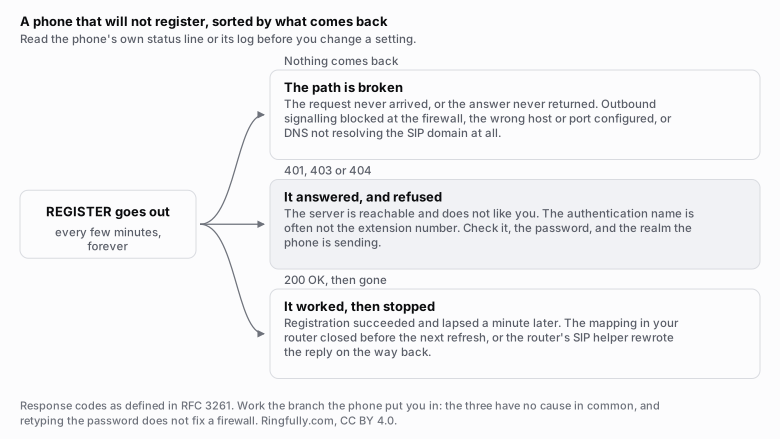
Sort by what comes back, not by what you suspect. The three branches have no cause in common.
Reuse this figure anywhere, including commercially, with credit to Ringfully and a link back to this page. CC BY 4.0.
Before touching a setting, find the phone's own status line or its log. Most desk phones will show you the last response code they received, and that code tells you which of the sections below to read. Guessing costs an hour; reading costs a minute.
1. The credentials
Start here, because this is where it usually is.
The problem is that four separate fields get conflated, and providers name them differently:
- The SIP user or extension. What the account is called.
- The authentication name or auth ID. What the phone presents when challenged. This is frequently not the same as the extension, and it is the single most common cause of a phone that will not register. If your provider lists both, they are both required and they are both different.
- The password. Case sensitive, often long, often pasted with a trailing space.
- The domain, registrar or realm, plus in many cases a separate outbound proxy that is a different host entirely.
Three specific traps:
A trailing space or a smart quote. Pasted from an email or a PDF, invisible in the phone's web interface. Retype it by hand once before concluding anything.
Lockout. A phone retrying with a wrong password every thirty seconds will, on many platforms, get the account blocked. Once that happens, fixing the password does not fix the phone until the block clears. If you have been retrying for an hour, stop, fix the credential, and wait.
Case. Some servers treat the user as case sensitive and some do not. Match the provider's document exactly rather than the tidier version.
What this looks like from the phone: the server answers, and it answers with a rejection. 401 or 407 repeating forever, 403, or 404 if the account does not exist at all.
2. Is the request leaving your network at all?
Different symptom entirely: nothing comes back. The phone retries, times out, retries.
That means either the request never arrived or the answer never returned, and the first thing to check is the transport, because it is the cheapest.
SIP conventionally uses port 5060 for plain UDP or TCP and 5061 for TLS. A provider may use something else. A phone configured for TLS while pointed at the plain port gets silence, which looks exactly like a firewall. So confirm three things against the provider's documentation, in this order: the host, the port, and the transport. Getting one of the three wrong produces the same symptom as all the network problems below, and it takes thirty seconds to rule out.
The fastest test in this whole article: put the phone on a different network. A laptop hotspot from a cell phone will do. If it registers there, the phone and the credentials are fine and everything left is on your network. If it does not register there either, go back to section 1.
3. The firewall
If the phone works on a hotspot and not in the office, this is where you are.
What to look at:
- Outbound signalling blocked. Outbound UDP to the provider's port is blocked more often than people expect, particularly on guest networks, on managed office firewalls with application-aware policies, and anywhere a security appliance has an opinion about voice traffic.
- The idle timeout. A stateful firewall holds an outbound UDP path open for a fixed period. If that period is shorter than the registration interval, the path closes between refreshes. This is the same mechanism as the section further down, and on a business firewall it is the more likely of the two.
- A rule that matches on protocol inspection rather than port. Some firewalls identify voice traffic and treat it specially even when the port is open.
Media is a separate matter and a separate range. The audio does not travel on the signalling port; it uses its own UDP range, commonly ten thousand and up. It only becomes relevant once registration works, and its symptom is one-way or absent audio rather than a phone that will not register.
4. The router's SIP helper
Consumer and small-business routers ship with a feature that inspects SIP messages and rewrites the addresses inside them, usually called SIP ALG or a SIP helper. It was designed to make things work behind NAT. On a current setup it usually breaks them instead, because it rewrites messages that did not need rewriting and gets them subtly wrong.
The symptoms it produces: a phone that registers and drops, a call that connects with audio in one direction, or a call that ends at the same number of seconds every time.
It is the most likely single cause once you have ruled out credentials and the firewall, and it has its own article: why to turn SIP ALG off explains what it does to a message and how to find the setting on the routers that hide it.
5. DNS
The last one, and the one that produces the most confusing symptom, because it looks identical to a blocked port.
Providers frequently publish their SIP service as an SRV record rather than a plain address record, which is the mechanism in RFC 3263: the phone looks up the service for the domain and is told which hosts, on which ports, in which order. A phone that only asks for an address record, or a resolver that will not return SRV records, ends up with nowhere to send anything.
Also worth checking: what DNS server the phone actually received from DHCP, whether that server is reachable, and whether a filtering resolver on the network is refusing the lookup. Resolve the provider's host from a computer on the same network and compare.
The special case: it registers, then drops a minute later
This one deserves its own section because people fix it repeatedly and it keeps coming back.
Your router keeps an outbound path open for its own idle timeout. Your phone asks the server to remember it for the registration interval. When the router's timeout is the shorter of the two, the path closes while the registration is still notionally valid, and the server's next message goes nowhere. The phone looks registered until it tries to refresh.
Three fixes, in order of how well they work:
- Use a connection-oriented transport. TCP or TLS holds a connection open, which is both more reliable through NAT and, in the TLS case, private. RFC 5626 describes the mechanism properly.
- Turn on the phone's keep-alive. It sends a small packet often enough to hold the path open.
- Shorten the registration interval below the router's timeout. Note that the server may refuse an interval it considers too short and say so with a 423 response, which is not an error on your part.
What to write down before you call support
Have these ready and the call takes five minutes instead of forty:
- The exact text the phone shows, and the last response code from its log.
- The model, and the firmware version.
- The host, port and transport configured, and the auth name as entered.
- Whether another phone on the same network registers.
- Whether this phone registers on a different network.
That last pair is the whole diagnosis in two lines, and it is the pair nobody has ready.
One case this article does not cover: a phone that was registered and went away because the connection did. That looks different and behaves differently, and what happens when your internet drops is the one to read instead.
More on this topic in SIP and networks.
Where this does not apply
Ringfully has no desk phones, so none of the above happens to our customers: a person answers in a browser tab or in the Windows desktop application, and there is no registration to configure, no auth name to get wrong and no MAC address to provision.
What does carry over is everything underneath. A firewall with an opinion about voice traffic, a router mangling packets, and a connection with no room at the busy hour all still produce bad calls. They just show up as audio problems rather than as a phone that will not come up. How much bandwidth VoIP needs covers the capacity half of that, and if calls are breaking up and you cannot see why, tell us what you are hearing.
Questions people ask
- Why is my VoIP phone not registering?
- In order of likelihood: the credentials are wrong, most often because the authentication name is not the same as the extension number; the request is not leaving your network because the signalling port is blocked; the transport or port does not match what the provider expects; the router's SIP helper is rewriting the messages; or DNS is not resolving the provider's host.
- What does SIP registration actually do?
- It tells the system where to send calls for an account. The phone sends a REGISTER request saying this account is reachable at this address for this long, the server challenges it, the phone answers with a digest of the password, and the server confirms with the interval it will honour. Registering never places a call. It only publishes an address.
- My phone registers and then drops after about a minute. Why?
- Almost always the mapping in your router closing before the next refresh. Your router holds an outbound path open for its own idle timeout, which is frequently shorter than the registration interval, and once it closes the server's next message has nowhere to go. Shorten the registration interval, enable the phone's keep-alive, or use a connection-oriented transport.
- What port does SIP use?
- 5060 for plain UDP or TCP, and 5061 for TLS, by convention. A provider may use something else entirely, and a phone configured for TLS while pointed at the plain port simply gets nothing back. Check which transport and which port the provider actually wants before changing anything else.
- The phone worked yesterday and stopped today. What changed?
- Something on the network, in almost every case. A firmware update on the router, a new firewall rule, a DHCP lease handing out a different DNS server, or a provider-side password reset. Test the same phone on a different connection, such as a laptop hotspot. If it registers there, the phone is fine and the network is the problem.
About the author
John
Owner and CEO
Owner and CEO with over 10 years of experience in the IT industry, including more than 5 years specializing in VoIP and cloud communications. Experienced in designing, deploying, and supporting reliable communication solutions for businesses.

Keep reading
If calls drop, go one-way or break up on your network, tell us what connection and router you have, and we will say where we would look first.