Blog
What is a VoIP phone?
A VoIP phone is a small computer shaped like a telephone. What it plugs into, what it needs from your network, and whether your team needs one at all.
John · Owner and CEO · 5 min read ·
A VoIP phone is a desk telephone with an Ethernet port instead of a telephone jack. Inside it is a small computer: it takes an address on your network, signs itself in to a phone service with credentials, and turns your speech into packets. The handset, the keypad and the hold button all work the way they always did.
What actually makes it a VoIP phone
Not the shape. Two things:
It speaks a signalling protocol. Almost always SIP, the Session Initiation Protocol, defined in RFC 3261. One of its methods is REGISTER, which is the phone announcing to the service where it can currently be reached. That is the piece with no analogue-world equivalent. A copper phone did not have to say who it was, because the wire already knew.
It carries audio itself. An old handset put voltage on a wire and the exchange did everything else. A VoIP phone encodes the sound, packs it into packets fifty times a second, and sends them to whatever address the call setup agreed on.
Everything else on the device is a user interface around those two jobs. Both of them only make sense against the wider picture in what VoIP is and how it works, which explains why the switching left the back room and what came with it.
What it plugs into
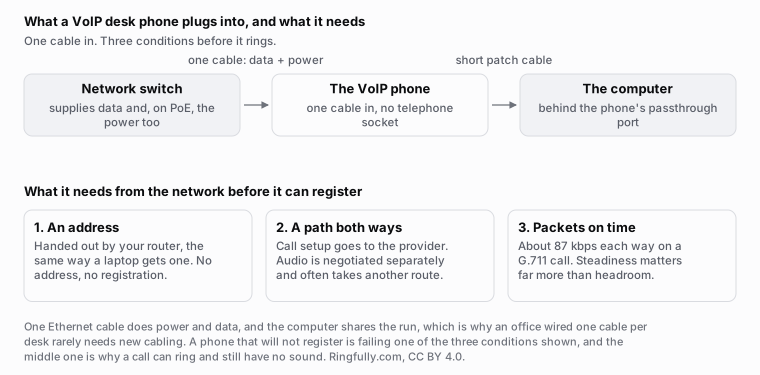
One cable does power and data. The three requirements on the right are what the phone needs before it can ring at all.
Reuse this figure anywhere, including commercially, with credit to Ringfully and a link back to this page. CC BY 4.0.
One Ethernet cable, into a network switch. If that switch supplies Power over Ethernet, the same cable carries the power and the phone needs no plug at all, which is why a wall of these looks tidier than the analogue phones they replaced.
Most business models have a second Ethernet socket on the back. The wall run goes into the phone, a short patch cable goes from the phone to the computer, and one cable per desk serves both. That detail is worth checking before anyone quotes you for new cabling.
The rest of the sockets are the ones you would expect: a curly cord to the handset, a headset port, and on some models a USB socket for a wireless headset dongle.
What it needs from your network
Three things, and a phone that will not register is almost always missing one of them.
- An address. Handed out by your router the way it hands one to a laptop. If a phone has none, it has no way to reach anything.
- A route to the phone service, in both directions. Call setup goes out to the provider. The audio is negotiated separately and often takes a different path, which is why the classic symptom is a call that rings normally and then has silence in it. That split is worth understanding before you start blaming the handset, and how a VoIP call actually travels walks through it.
- Delivery that is steady enough. A phone needs very little capacity, about 87 kilobits a second in each direction on a G.711 call once headers are counted. It needs those packets to arrive on time far more than it needs headroom. How much bandwidth does VoIP need has the arithmetic, and the honest limits of it.
Wired, not wireless, where you have the choice. Wi-Fi is where most small-office call quality complaints actually come from, and moving a phone onto a cable is the cheapest test you can run.
Do you need a desk phone at all?
For a lot of small teams, no.
The same service will ring a browser tab, or a small desktop app, on a computer that is already on the desk. It costs nothing extra in hardware, it moves when the person moves, and it puts the caller's details on a screen big enough to read. For anyone who spends the day in front of a computer, that is usually the better phone.
Desk phones earn their money in three situations. Someone sits in one place all day and wants to pick up a handset without touching a mouse. The spot has no computer: a reception counter, a workshop, a treatment room, a warehouse desk. Or the person simply will not use a computer to make calls, which is a legitimate answer and not one worth arguing with.
A common shape for a five person business is one desk phone at reception and software everywhere else.
If you are buying one
- Check Power over Ethernet on both the phone and the switch. Getting one and not the other means a wall wart at every desk.
- Check the passthrough port if the desk has one cable.
- Count the line keys you actually need. The temptation is to buy the twelve-key model. Most people use two.
- Buy the headset with the phone if anyone is on calls for hours. It is the single upgrade people notice.
- Ask whether the provider provisions the phone automatically. A handset that pulls its own configuration on first boot is fifteen minutes of work. One that does not is an afternoon of typing settings into a web page.
What a desk phone will not fix
A better handset does not change who a call reaches. If calls ring out while everybody is busy, that is a decision about routing, not hardware, and it is answered in how many people do you need to answer calls and by deciding what happens when nobody picks up.
It also does not change the power question. Every VoIP phone stops when the building does, and the useful response is deciding in advance where calls go instead.
Worth saying plainly where we stand, because this article is about a device we do not use. With Ringfully there is no handset: each person answers in a browser tab or in the Windows desktop application, on the computer they already work on, with a headset. That suits a team that sits at computers and does not suit a counter with no screen on it. Either way there is no hardware line on our pricing, because there is no hardware. If you want more of the background first, the rest of VoIP basics covers it.
Questions people ask
- What makes a phone a VoIP phone?
- It has an Ethernet port instead of a telephone jack, and it signs itself in to a phone service over the network using credentials, the way an email client signs in to a mailbox. Everything else about it, the handset, the keypad, the hold button, is unchanged. Inside, it is a small computer running a network stack.
- What does a VoIP phone plug into?
- One Ethernet cable, usually into a network switch that also supplies power over that same cable. Most business VoIP phones have a second Ethernet socket so a computer can share the run, which is why an office wired for one cable per desk rarely needs new cabling. There is no telephone jack.
- Do VoIP phones need power?
- Yes, and this is a real difference from an old analogue phone, which drew its power from the telephone exchange and kept working in a blackout. A VoIP phone takes power either from a plug or from the network cable itself. When the building loses power, the phone stops.
- Do I need a desk phone at all?
- Often not. The same service can ring a browser tab or a desktop app on a computer people already have, which costs nothing extra and moves with them. Desk phones earn their place where someone sits in one spot all day, wants a physical handset, or works somewhere a computer is awkward: a counter, a workshop, a treatment room.
- Can I keep my old analogue phones?
- Sometimes, through a small adapter that presents a telephone jack on one side and the network on the other. It works, and it is usually a stopgap. The adapter is one more thing to power, to configure and to blame when something goes wrong, and it gives you none of the features the newer handset would have.
- Are cordless phones available for VoIP?
- Yes. A DECT base station connects to the network like a desk phone and the handsets pair to it, which is the usual answer for a shop floor or a large space. It behaves like a desk phone that walks, and it has the same power dependency as everything else.
About the author
John
Owner and CEO
Owner and CEO with over 10 years of experience in the IT industry, including more than 5 years specializing in VoIP and cloud communications. Experienced in designing, deploying, and supporting reliable communication solutions for businesses.

Keep reading
If you are working out whether VoIP suits your team, tell us how many people answer the phone and what your connection is like, and we will say plainly whether it fits.