Blog
A phone tree template that works
A copyable menu: one greeting, three options and four exits, with the wording written out. What to change, what to leave, and where each line has to land.
John · Owner and CEO · 5 min read ·
Here is a phone tree you can copy: one greeting, three options, and four exits. The wording is written out, because a template that only shows boxes leaves you with the hard part. Change the business name and the three destinations and it will work for most small offices.
The template, word for word
Read this aloud once before you record it. If a line makes you pause to work out how to say it, rewrite the line.
"Thanks for calling Northgate Plumbing.

 To book or change a visit, press 1.
 For a bill or a payment, press 2.
 For anything else, press 3."
Four sentences. The business name, then three options, each naming what the caller wants before it names the key.
That order is the one structural rule in the whole template. "For a bill or a payment, press 2" lets the caller stop listening the moment they hear their own problem. "Press 2 for accounts receivable" asks them to hold a digit while they work out whether that is them, and the usual result is that they listen to the whole menu twice.
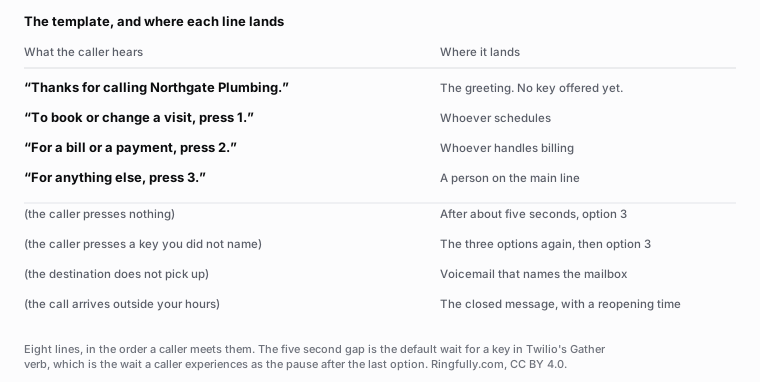
The four silent cases sit in the same list as the four spoken ones, because a template that leaves them out has handed you the easy half.
Reuse this figure anywhere, including commercially, with credit to Ringfully and a link back to this page. CC BY 4.0.
The four exits nobody writes down
The spoken half is easy and everybody gets it roughly right. The half that decides whether your menu works is the four cases with no wording at all, because each of them happens on every line, every week.
The caller presses nothing. They are on a handset that is not sending tones, or they were not listening, or they are driving. Send them to option 3. Do not replay the menu: a caller who did not press a key the first time is not more likely to press one the second time. The pause before this fires is short. Twilio's Gather verb, which is what collects the key, waits five seconds by default, and that default is roughly the length of silence a caller reads as "this thing is broken".
The caller presses a key you did not name. Usually 0, sometimes 4 because they guessed. Repeat the three options once, then send them to option 3. Once, not until they get it right.
The destination does not pick up. Voicemail, and the recording names the mailbox: "You have reached the Northgate Plumbing booking line." A caller who has pressed 1 and then hears a generic mailbox greeting cannot tell whether the menu worked.
The call arrives outside your hours. A closed message that says when you reopen, and then a mailbox. Not the menu. Where each of those three destinations makes sense is worked through in after-hours call handling.
What to change, and what to leave alone
Change the business name, obviously. Change the three destinations to the three things your callers actually ring about, which is usually not the three departments you have. And change the after-hours reopening time, which is the line most likely to be stale a year from now.
Leave four things alone:
- Three options. A fourth costs you the first three.
- The action before the key. Every line.
- A person on option 3. Not another menu, not a mailbox.
- Four exits, all pointed somewhere. This is the part people delete.
The most common edit that breaks the template is adding options. If you have five things callers ring about, the answer is not five keys: it is three keys where the third one reaches a person who can hear the other two.
If you are building the menu from scratch rather than copying this one, how to build an auto attendant callers stay on works through the reasoning behind these choices instead of the wording.
A second level, if you really need one
Sometimes you do. A clinic with three practitioners, a shop with two locations, a firm where "a bill" splits into two genuinely different desks.
If so, put the second level behind exactly one option, keep it to three choices too, and give it its own zero-out to a person. Never build a third level. And before you build the second one, check that your first level is naming the caller's problem rather than your organisation chart, because a level that names departments almost always needs a level underneath it to explain them.
There is a way to find out whether the second level is working, which is to walk every path in it and see where it ends: find the dead ends in your phone menu.
Recording it
The template above is a script for one recording, not four. But a working line needs more than the menu prompt: a greeting, the closed message, the mailbox greeting, and a hold message all have to exist and say consistent things about the same business. The full set is in the six messages a phone line needs.
If you are recording your own audio, the file format is a real obstacle and it fails in an unhelpful way: why your phone system rejects your greeting file.
The keys you can use are also fixed and worth knowing: ITU-T E.161 sets out the arrangement of digits, letters and symbols on a telephone, which is why every menu in the world offers you 0 through 9, star and hash and nothing else. There is no key for "I do not know".
How it works underneath
In Ringfully this template is one flow, drawn once. A Business hours block sits at the top, so the closed exit is a decision made before the greeting rather than a separate after-hours number. Play message carries the greeting. Collect digits / Menu holds the three keys, and its no-input and unknown-key ports are real exits on the block rather than an implicit default, which is why the four silent cases above are things you choose rather than things you inherit. Transfer to queue points each key at the people who should take it, and Voicemail catches what nobody answers.
You edit it and press publish yourself, and anyone already on the line finishes on the menu they started with: change your auto attendant menu yourself.
Start from what is an auto attendant if you are not sure you need one, read auto attendant mistakes that lose callers before you record, and the rest of the subject is under call flows. If you want a second pair of ears on your script before it goes live, send us what your line says today.
The wording above is a starting point, not a rule. Northgate Plumbing is invented; the structure is not.
Questions people ask
- What do I have to change in this template before recording it?
- Three things, and only three: the business name in the greeting, the three destinations behind the keys, and the closed-hours wording. Everything else in the template is phrasing that works regardless of what the business does, which is the point of writing it out rather than drawing boxes.
- What are the four exits, and why do they matter?
- A caller who presses nothing, a caller who presses a key you did not offer, a call nobody answers, and a call that arrives when you are closed. They are the paths no one writes down because no one pictures a caller taking them, and they are where callers are lost.
- What do I say when the caller presses nothing?
- Nothing extra. Send them to a person. Silence usually means a caller on a handset that is not sending tones, or somebody who was not listening, and neither is helped by hearing the menu a third time.
- Do I need a second level of menu?
- Rarely. A second level is usually a sign the first level named departments instead of problems. If you genuinely need one, put it behind a single option and never build a third, because nobody has ever pressed four keys to reach a plumber.
- What should the after-hours version say?
- The same tree with one different door. Say you are closed, say when you reopen, and offer a mailbox. Do not offer options nobody is behind, because a menu whose keys all lead to voicemail is a worse experience than a closed message.
- How long should the whole thing take?
- Short enough that the last option is still audible after the first. Read the script above aloud at the pace you speak to a customer: if it runs long, the fix is fewer words per line rather than a faster voice.
About the author
John
Owner and CEO
Owner and CEO with over 10 years of experience in the IT industry, including more than 5 years specializing in VoIP and cloud communications. Experienced in designing, deploying, and supporting reliable communication solutions for businesses.

Keep reading
A free tool for this, in your browser: the phone menu builder.
If your phone menu sends people to the wrong place, or the wrong message plays after hours, describe what a caller hears today and we will tell you how we would set it up.