Blog
What is an auto attendant?
An auto attendant answers your main number and routes the caller by key. What it decides, what it cannot fix, and the size of business that does not need one.
John · Owner and CEO · 5 min read ·
An auto attendant is the recorded voice that answers your main number and asks the caller to press a key. It is a routing device, not a receptionist: it decides which phone rings, and nothing else. Under about five people answering one number, you probably do not need one.
What it does to a call
Four steps, and that is the whole mechanism.
Your number is answered by the system rather than by a person, so nobody has been disturbed yet. A greeting plays, either a recording you made or generated speech. The caller presses a key, which sends a pair of tones down the line: the frequencies are fixed by ITU-T Q.23, "Technical features of push-button telephone sets", which is why every phone made since the 1960s can drive every menu. And the key names a destination, so one phone or one mailbox is finally asked to do something.
That is it. An auto attendant is a lookup table with a voice.
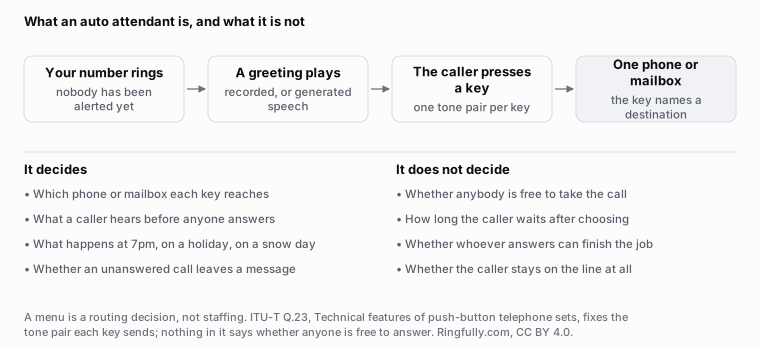
A menu is a routing decision. The right-hand column is the list of problems buying one will not touch.
Reuse this figure anywhere, including commercially, with credit to Ringfully and a link back to this page. CC BY 4.0.
Auto attendant, IVR, virtual receptionist
Three names, two of which mean nearly the same thing and one of which does not.
Auto attendant is the routing case: greeting, keys, destinations. IVR, interactive voice response, is the broader term and covers systems that also collect information from the caller and act on it, like reading back an order status or taking a payment. Every auto attendant is an IVR; most IVRs a small business meets are just auto attendants. Vendors use the two words interchangeably and it rarely matters which one you say.
Virtual receptionist is a different product. That is usually a human being at an answering service, taking your calls under your business name. It costs per call or per minute rather than per month, and it can do the thing a menu cannot: understand a caller who does not fit any of your three options.
If you are choosing between them, the question is whether your callers mostly know what they want. Menus are good at sorting people who do, and bad at helping people who do not.
When a business is too small for one
A menu costs the caller something. Every one of them adds a greeting, a list, and a decision before the caller reaches a human. That is worth paying when it saves a wrong transfer, and it is pure loss when it does not.
You are probably too small if all three of these are true:
- Everyone who answers can handle the same calls. A menu that routes to interchangeable people just delays them.
- One person answers, and the rest of you are backup. A menu does not create the second person.
- Callers ask for a person by name, not for a department. They will press 0 or wait, and your menu will be an obstacle.
Two or three people in one office, all fielding the same enquiries, are usually better served by making sure the call reaches whoever is free and that nothing rings out. What that costs and what it is worth is in what missed calls are actually worth, and the staffing question underneath it in how many people do you need to answer calls.
What an auto attendant cannot fix
This is the section most vendor pages leave out, and it is the reason menus disappoint.
An auto attendant decides where a call goes. It has no view on whether anybody is there. Put one in front of a team that is already too busy to answer and the caller now presses 2 and then waits, which is worse than waiting immediately, because you asked them to do work first.
It also cannot tell whether the person behind option 2 can actually finish the job, cannot notice that option 3 has been ringing an empty desk for a month, and cannot make a caller who does not recognise any of your options choose correctly.
None of that is an argument against menus. It is an argument for being clear about which problem you are buying a solution to: routing, not capacity. The capacity problem has its own answer, and it starts with missed calls while everyone is busy.
How it works underneath
In Ringfully, an auto attendant is not a product you switch on. It is a flow you draw for your number, and the menu is one step in it.
A Business hours block decides open or closed before the greeting plays, so an after-hours caller never hears a menu whose options nobody is behind. Play message is the greeting. Collect digits / Menu is the menu itself: the keys, and what each one points at. Transfer to queue hands the call to the people who should take it, Announce wait time and Offer a callback are what a waiting caller can be given, and Voicemail catches what is left. There are 28 kinds of step in total and 6 ready-made menus to start from.
You edit it yourself and press publish, which is a different subject: change your auto attendant menu yourself.
Where to go next
If you have decided you want one, the next two questions are what it should say and what it should not do. Both are answered concretely: a phone tree template that works gives you the wording, and auto attendant mistakes that lose callers covers the five failures that cost the most. The structural version of the same argument, and the six recordings a line needs to be complete, are in the six messages a phone line needs.
The rest of this subject sits under call flows. If you want somebody to listen to what your number does today before you change anything, send us the number.
Terminology in this area is not standardised and vendors use "auto attendant" and "IVR" differently. The distinction drawn above is the common one in small-business telephony, not a definition from a standards body.
Questions people ask
- What does an auto attendant do?
- It answers your published number before a person does, plays a greeting, and sends the caller to a phone or a mailbox based on the key they press. It is a routing decision made by a recording. It does not answer questions and it does not take the call.
- Is an auto attendant the same as an IVR?
- In small-business use, close enough that arguing about it wastes time. An auto attendant routes to a person. An IVR can also collect information and act on it, like reading an account balance. Most small businesses buy the first and hear it called the second.
- Is an auto attendant a virtual receptionist?
- No. A virtual receptionist is usually a person at an answering service who takes your calls. An auto attendant is a recording and a keypad. They solve overlapping problems and they cost very different amounts.
- Do I need an auto attendant?
- If one number reaches people who do genuinely different jobs, or if calls arrive outside your hours, probably. If two or three people all answer the same kinds of call, a menu adds a step for the caller and solves nothing you have.
- Can an auto attendant stop calls being missed?
- No. It decides where a call goes, not whether anybody is free to take it. A menu in front of an unstaffed line just makes the caller press a key before they wait. What it can do is give the caller a mailbox or a callback instead of ringing out.
- How many options should the menu have?
- Three at the first level, in most small businesses. A caller holds about that many in mind, and a fourth and fifth mean they stop listening and start guessing. Anything else belongs behind the third option rather than beside it.
About the author
John
Owner and CEO
Owner and CEO with over 10 years of experience in the IT industry, including more than 5 years specializing in VoIP and cloud communications. Experienced in designing, deploying, and supporting reliable communication solutions for businesses.

Keep reading
A free tool for this, in your browser: the phone menu builder.
If your phone menu sends people to the wrong place, or the wrong message plays after hours, describe what a caller hears today and we will tell you how we would set it up.