Blog
Auto attendant mistakes that lose callers
Five failures in menus that are wired correctly: too many options, no way to a person, department names, a key that cannot help, a greeting that rambles.
John · Owner and CEO · 7 min read ·
Five things make a caller hang up on a menu: too many options, no way to reach a person, options named after your org chart, an option answered by someone who cannot help, and a greeting that talks before it offers anything. All five are wording, not technology, and all five are free to fix.
None of these is a fault you would find by testing. If you are still deciding whether to have a menu at all, what an auto attendant is covers what one does and when it earns its place; this article assumes you have one. Press every key on any of the five menus below and a phone rings somewhere, every time. The mechanical faults, the key that leads nowhere and the menu that only leads to more menus, are a separate list with a separate method: find the dead ends in your phone menu. This list is about menus that work and lose people anyway.
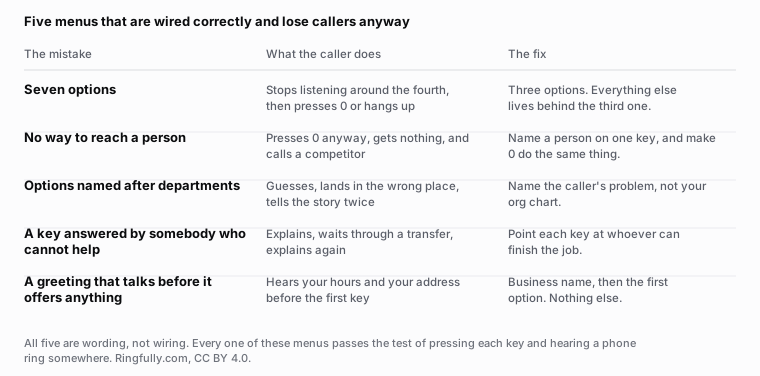
Every menu in this table passes the mechanical test: press a key, hear a phone ring. The middle column is what happens anyway.
Reuse this figure anywhere, including commercially, with credit to Ringfully and a link back to this page. CC BY 4.0.
1. Too many options
A caller is holding your list in their head while a stranger reads it to them. Somewhere around the fourth item they stop holding it and start waiting for the end, which means options five, six and seven are not competing with each other. They are erasing options one, two and three.
The symptom is not that people choose the wrong option. It is that people choose the last one they heard, or press 0, or hang up and ring the number on your invoice instead.
The fix. Three options. Everything else lives behind the third one, which is a person. That is not a compromise: a person can route a caller better than a menu can, because they can ask.
The counter-argument is always the same, that you have seven genuinely different things. You probably have three things and four ways of describing two of them. The test is whether a caller who does not work for you could tell two of your options apart.
2. No way to reach a person
Callers press 0. They press it on menus that offer it and menus that do not, they press it in the middle of the greeting, and they press it because whatever they are ringing about does not sound like any of your options.
So the only real choice is whether 0 does something useful or plays an error tone. There is no version of this where the caller does not press it.
The fix. Two parts, and both matter. Name a route to a person out loud, as one of your three options. And make 0 do the same thing, whether or not you said so. A caller who presses 0 and gets a person is a caller who stays; a caller who presses 0 and hears "that is not a valid option" has learned that your phone system is an obstacle rather than a route.
This is not the same as a key that goes nowhere, which is a wiring fault. A menu can be perfectly wired and still have no door marked "human".
3. Options named after your org chart
"For customer service, press 2" asks the caller to know how you are organised. They do not, and the ones who guess correctly are guessing.
Nobody rings a plumber wanting the operations department. They want somebody to come out on Tuesday, or they want to know why the bill says what it says. Those are the two options. Whether your business calls the first one scheduling, dispatch or the diary is your internal business and belongs nowhere near a caller.
The fix. Name the caller's problem, not your team. "To book or change a visit, press 1." "For a bill or a payment, press 2." Both name a thing a caller already knows they want before they name a key.
There is a second-order benefit. Options named after problems are much harder to accumulate, because "a bill or a payment" absorbs three internal desks, whereas department names multiply as fast as your organisation does.
4. A key answered by somebody who cannot help
The subtle one, and the one nobody catches by pressing keys.
Option 2 rings. A person answers. The caller explains the whole thing. And that person says "let me put you through to somebody who deals with that", and the caller explains it again to somebody else.
From the caller's side, option 2 did not work. From your side, everything worked: the key rang, the phone was answered, the transfer completed. This is why menus get graded as fine by the people who built them and badly by the people who use them.
The fix. Ask, for each key, who finishes the job rather than who takes the call. If the honest answer for option 2 is "it depends", the option is naming a category that splits, and it needs either a clearer name or a different destination. And where a handover really is unavoidable, hand the caller over properly rather than pushing them: why the transfer is the hard part and assisted transfer, hold and conference.
5. A greeting that talks before it offers anything
"Thank you for calling Northgate Plumbing, serving the tri-county area since 1994, family owned and operated, open Monday to Friday eight to five, visit us online at northgate dot com, and please listen carefully as our options have recently changed."
Forty words before the first key. The caller who wanted your hours would have looked at your website. The caller who is on the phone wants a person, and you have spent their whole attention span on things they did not ask for.
"Our options have recently changed" deserves its own note. It is asking the caller to listen harder to compensate for a change you made, and it is on menus that have not changed in six years.
The fix. Business name, then the first option. That is the whole greeting. Your hours belong in the closed message, where they answer a question the caller is actually asking, and the rest belongs on your website. What each of the six recordings on a line has to say, and which two go missing every time, is in the six messages a phone line needs.
Fixing all five in one sitting
Call your own number from a phone that is not on your system, with a pen.
- Time the greeting before the first option. If it is over five seconds, cut it.
- Count the options. If there are more than three, write down which two you would delete if you had to.
- Press 0. Note what happens.
- Press each key and ask the person who answers how often they have to pass that caller on.
- Press nothing at all and see where you end up. The gap before that fires is short: Twilio's Gather verb, which is what collects a key on our own menus, waits five seconds by default.
That is fifteen minutes, and four of the five fixes are wording changes you can record the same afternoon. The fifth, question four, is the one that sometimes tells you your menu is not the problem: if every key leads to somebody who cannot finish, the issue is who is behind the number rather than what the recording says. That question has its own answer in how many people do you need to answer calls.
How it works underneath
The reason these are worth fixing in Ringfully rather than filing as a wishlist item is that the exits are explicit. The Collect digits / Menu block has real ports for no input and for an unknown key, so "what happens when they press 0" is a line you draw rather than a default you inherit. Business hours decides open or closed before Play message speaks, so a caller after five never hears options nobody is behind. Transfer to queue is where you answer question four, because it names who is offered the call. And Announce wait time and Offer a callback are what a caller gets instead of an unexplained silence once they have chosen.
You edit the wording and press publish yourself, without a phone engineer and without a ticket: change your auto attendant menu yourself.
If you want the structure that avoids all five, it is written out as a script in a phone tree template that works, and the rest of the subject is under call flows. If you would rather somebody else called your line and told you what they heard, ask us to.
Northgate Plumbing is invented, and the greeting in section five is a composite rather than a quotation from any real business.
Questions people ask
- How many options is too many in a phone menu?
- Four. Three is what a caller can hold while listening, and every option past that costs you the ones before it, because the caller stops holding the list and starts waiting for the end. Cut to three and move the rest behind the third.
- Should a phone menu let callers press 0 for a person?
- Yes, and it should also name that route out loud. Callers press 0 whether or not you offer it, so the choice is between a key that works and a key that plays an error. One of those two is a caller who stays.
- Why do callers press the wrong option?
- Usually because the options are named after your departments rather than their problems. Nobody rings a plumber wanting the operations team. They want somebody to come out on Tuesday, and that is what the option should say.
- How long should a phone greeting be before the first option?
- Your business name, then the first option. Hours, address, website and promotions all belong somewhere else, because a caller who wanted your hours would have looked at your website instead of dialling.
- Is it worse to have a menu or no menu?
- A bad menu is worse than no menu, and a good one is better than both. If your five options all reach the same three people, the menu is a delay you are charging the caller for. That is a real reason to remove one rather than fix it.
- How do I know which of these my menu has?
- Call your own number from a phone that is not on your system and press each key, including 0 and nothing at all. It takes fifteen minutes and it is the only test that sees what a caller sees.
About the author
John
Owner and CEO
Owner and CEO with over 10 years of experience in the IT industry, including more than 5 years specializing in VoIP and cloud communications. Experienced in designing, deploying, and supporting reliable communication solutions for businesses.

Keep reading
A free tool for this, in your browser: the phone menu builder.
If your phone menu sends people to the wrong place, or the wrong message plays after hours, describe what a caller hears today and we will tell you how we would set it up.