Blog
On-premise PBX vs a cloud phone system
The real difference is not price, it is which failure is yours to fix. Capital against subscription, who owns the outage, and where a local switch still wins.
John · Owner and CEO · 6 min read ·
The difference is not really cost, it is which failures are yours. An on-premise exchange is bought once and maintained forever; a cloud system is rented and maintained by somebody else. Both put a single point of failure somewhere. The question worth asking is which one you would rather be standing next to when it breaks.
Capital against subscription
A local switch is a purchase. The chassis, the cards, the handsets, the cabling and the installation are money spent once, sitting on your books and depreciating, followed by a maintenance contract and a charge every time somebody wants a change. If the word itself is doing work you are not sure of, what a PBX phone system is explains the station side, the trunk side and why the box existed at all.
A cloud system is a subscription. Nothing is bought, nothing depreciates, and the bill arrives every month for as long as you use it.
Neither shape is better. They fail differently, and that is the useful thing to know:
- A purchase is hard to reverse and easy to ignore. Once it is installed you stop thinking about it, which is how offices end up running a switch that nobody has patched in six years.
- A subscription is easy to reverse and hard to ignore. It is on the bill every month, which means it gets questioned every year, which is why it also gets kept current.
The comparison people usually run is total cost over five years. It is worth doing, and it is worth doing honestly: the purchase side has to include the maintenance contract, the moves-and-changes charges, the outside lines on their own bill, and the hour of somebody's time every time the system needs something. The true cost of a business phone system lists the pieces that get left out.
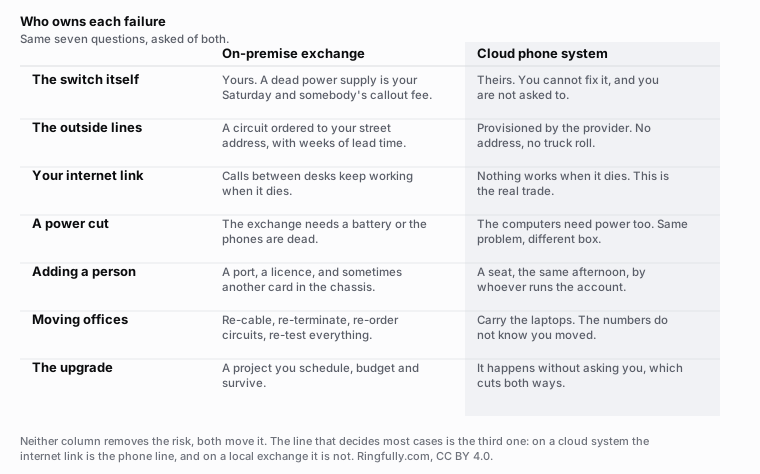
Seven questions asked of both. Neither column removes the risk; both move it somewhere else.
Reuse this figure anywhere, including commercially, with credit to Ringfully and a link back to this page. CC BY 4.0.
Who owns the outage
This is the line that actually decides most cases, and it is not a cost question.
With a switch in your closet, every failure is yours. A power supply dies on a Saturday and you are the one calling somebody out. A firmware update goes wrong and you are the one holding it. In exchange, you can go and look at it, you can put a battery under it, and nobody else's bad day becomes yours.
With a cloud system, you cannot fix anything. When the provider has a problem you sit and wait with everyone else. In exchange, you were not going to be able to fix it well anyway, and the person who can fix it does this all day.
There is a third failure that belongs to neither of them and to both of you: your internet connection. On a cloud system it is the phone line, and when it drops so does everything. On a local switch, calls between desks keep working because they never leave the building. That is a genuine advantage and it is smaller than it sounds, because most businesses discover that a day without any outside calls is not much better than a day without any calls.
What a physical move actually costs
Ask anybody who has moved a small office with a local switch. The chassis has to come out, the cabling at the new address has to be run and terminated, the outside lines have to be ordered at the new address with weeks of lead time, and everything has to be re-tested on a weekend.
Ask anybody who has moved with a cloud system. They carried the laptops.
This one is not close, and it is worth weighting properly if a lease is coming up. It is also worth knowing where your responsibility starts and stops in the old model: the boundary is the demarcation point, and under 47 CFR 68.105 the carrier has to tell a premises owner where it is within ten business days of a request. Everything on your side of it is yours to move.
Where on-premise still genuinely wins
A comparison where one column wins every line is an advertisement. Here are the cases where the local switch is the right answer, and they are specific:
- The internet at that site is genuinely bad or genuinely expensive. A rural yard, a basement clinic, a site on a single fixed-wireless link. If calls must keep working when the link does not, they have to be switched locally.
- The building is full of equipment that only speaks to a local system. Overhead paging in a warehouse, an intercom, a nurse call system, a door station wired to a strike relay. Every one of those is a separate project when the switch leaves.
- A large population of handsets that mostly dial each other. A hotel, a school, a plant with two hundred sets. In the cloud model each of those becomes a per-seat charge whether it is used or not.
- The chassis is two years old and the maintenance contract is paid. Money already spent is a bad reason to keep bad kit, and a fine reason to wait eighteen months.
- A site where nothing is allowed to leave the building. That is a real constraint in some sectors, and no hosted service answers it.
If none of those five describes you, the local switch is probably being kept out of habit.
The option most comparisons leave out
You do not have to choose between the two columns. If the box in the closet is an IP switch and it works, you can replace only the lines: SIP trunking into the existing system, keeping the switch and the handsets and changing the bill from a circuit to a subscription.
That is a different purchase from a hosted phone service, from different vendors, and it is worth pricing separately before you replace everything. It buys you the cheaper lines without the cutover, and it postpones the harder decision until the hardware is genuinely at the end of its life.
How to decide in an afternoon
Four questions, in this order. The first one that gives you a hard answer is your answer.
- Does anything in the building only speak to a local switch? If yes, price that migration separately before anything else. It often costs more than the phone system.
- What happens to your business on a day with no internet? If the honest answer is "we send everybody home anyway", the local switch's survival advantage is worth nothing to you.
- How much upload do you have at the busiest hour? Calls are small but they are not free, and the upload is what runs out first. How much bandwidth VoIP needs has the arithmetic.
- When is the lease up? A move is the cheapest moment to change, and the most expensive moment to be carrying a chassis.
More on this topic in migration.
What we are, and what that costs you
Ringfully is the cloud column, without hedging: there is no box, no rack, nobody comes to your office, and a person answers in a browser tab or the Windows desktop application. The switching, the hours, the flows and the numbers all live in software.
The honest cost of that is the third failure above. Your internet connection is the phone line. We do not sell equipment for the closet, we do not sell trunks into somebody else's switch, and if your building genuinely needs calls that survive a dead link, we are not the answer to that part of the problem.
If you already know which column you are in and want to see what the move looks like in order, read how to replace an aging PBX. If you want the numbers, our pricing is per seat and published.
Questions people ask
- Is a cloud phone system cheaper than an on-premise PBX?
- Over a long enough life, often not. A local switch is a large purchase followed by small bills, and a cloud system is no purchase followed by a bill every month forever. What usually decides it is not the total but the shape: one is a capital decision made once, and the other is an operating cost you can stop.
- What is the biggest difference between a PBX and a cloud phone system?
- Which failure is yours. With a local switch, a dead power supply is your Saturday and your callout fee. With a cloud system you cannot fix the outage, and you are also not the one who has to. Neither removes risk. They move it to a different party.
- Does an on-premise phone system still work when the internet goes down?
- Calls between desks in the building do, because they never leave the building. Calls to the outside world depend on how the outside lines arrive. If they are copper or a digital circuit from the phone company, they survive. If the system is fed by SIP trunks over the same internet connection, they do not.
- When is an on-premise PBX still the right choice?
- A site with genuinely poor internet, a building full of equipment that only speaks to a local switch such as overhead paging or an intercom, a large population of handsets that mostly dial each other, or a chassis bought recently with a maintenance contract already paid. Those are real cases, not excuses.
- What does it cost to move offices with each one?
- With a local switch: re-cabling, re-terminating, ordering circuits at the new address with weeks of lead time, and re-testing everything. With a cloud system: carry the laptops. The numbers do not know you moved, because they are not tied to a pair of wires at a street address.
- Can I keep my PBX and change only the lines?
- Often yes, and it is the option most comparisons leave out. Replacing copper or a digital circuit with SIP trunking into an existing IP switch keeps the box and changes the bill. It is a different purchase from a hosted service and worth pricing separately before you replace everything.
About the author
John
Owner and CEO
Owner and CEO with over 10 years of experience in the IT industry, including more than 5 years specializing in VoIP and cloud communications. Experienced in designing, deploying, and supporting reliable communication solutions for businesses.

Keep reading
A free tool for this, in your browser: the phone cost comparator.
If you are leaving an on-premise system or a Centrex line, tell us what you have and when the contract ends, and we will lay out the order things have to happen in.