Blog
The four types of call forwarding
Always, on busy, on no answer, on unreachable. What each one is for, which to pick, and the ordering mistake that quietly strands every caller you have.
John · Owner and CEO · 6 min read ·
There are four. Always, which sends every call before your phone rings. On busy. On no answer, after a timer. And on unreachable, when the line is off or out of coverage. The first overrides the other three, which is the mistake that strands most callers.
Always: unconditional forwarding
Every call, immediately, with no attempt to reach your line first. This is the version behind the plain *72 code and behind the Call Forwarding switch in a phone's settings.
It is the right answer in exactly one situation: your line is not somewhere anybody should be reaching. A closed location, a number you have finished with, a phone left in a drawer during a two-week shutdown. In that case, redirecting before anything rings is honest and fast.
It is the wrong answer for a working line, because it removes the possibility that you might have picked up. And it is the setting that breaks the other three, which is the section below.
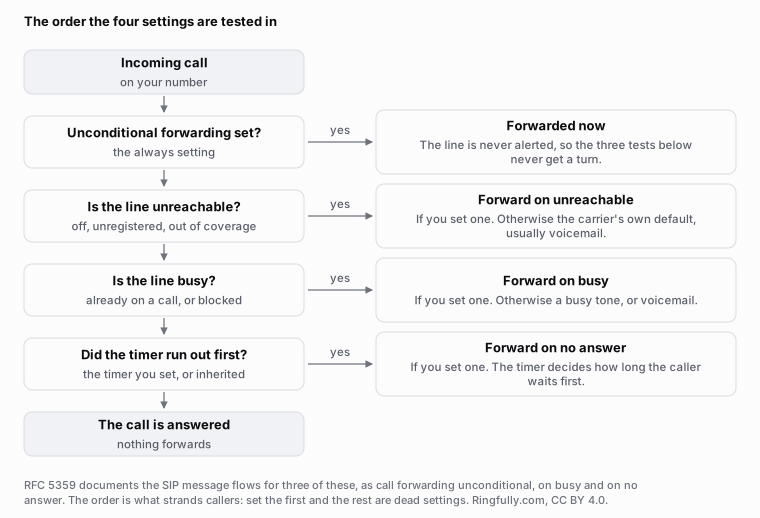
The four settings are not four parallel options. The first one tested is the one that decides, and when it matches, the rest never run.
Reuse this figure anywhere, including commercially, with credit to Ringfully and a link back to this page. CC BY 4.0.
On busy
Redirects only when your line cannot take another call. On a mobile that means you are already talking; on an analogue line with one channel it means the same thing physically.
The trap here is that "busy" is less common than it used to be. A phone with call waiting is rarely busy in the sense the network means, so a forward on busy can sit configured for years and never fire once. If you set it because callers were getting a busy tone and they still are, check whether your line reports busy at all.
On no answer, and the timer nobody sets
The most useful of the four for a working business line, and the one with a hidden dial.
The condition is not "you did not answer". It is "you did not answer within N seconds", and N is a timer that belongs to the setting. Carriers ship a default and most people never touch it, which produces two opposite complaints from the same configuration:
- Too short. The call forwards while somebody is still walking to the phone. It reads as the phone barely ringing.
- Too long. The caller hangs up before the redirect happens, so the forward never fires and nobody at either end knows the setting exists.
Ask your carrier what the timer is on your line, not what the default is. Then count the rings from a third phone, because that number is the one your callers experience. This is the same class of problem as a phone menu whose exits nobody has walked: find the dead ends in your phone menu.
On unreachable
Fires when the line cannot be offered the call at all: powered off, out of coverage, or unregistered. On a mobile network it is the one people mean when they say "forward when my phone is dead", and it is a genuinely different condition from no answer, because there is nothing to time.
It is also the one most likely to be missing. Not every carrier and not every line type offers it, and where it is absent the calls fall through to whatever the line's default is, usually voicemail.
The ordering mistake: always beats the other three
The four are not four independent toggles that each get a look at the call. They are tested in order, and unconditional is first. When it is set, the call is redirected before the network makes any attempt on your line, so busy, no answer and unreachable are never evaluated. They sit in the settings screen looking configured and doing nothing.
That is the single most common reason a forward "does not work". Somebody set always forwarding months ago to cover a holiday, set on-no-answer forwarding this week to cover a customer, and the second one has no effect at all.
Three things follow, and they are the practical part of this whole post:
- Turn always off before you set anything conditional. Not after.
- A settings screen showing four toggles is lying about the structure. It is a chain, not a list.
- Test with a real call. The order is invisible in any configuration interface, and visible in one phone call from a third phone.
RFC 5359, the IETF's SIP service examples, writes out the message flows for three of these under the headings "Call Forwarding Unconditional", "Call Forwarding - Busy" and "Call Forwarding - No Answer". Reading them side by side makes the structural point better than any settings screen: the unconditional case never contains an attempt on the original line.
Which one you actually want
For most small businesses, on no answer, with a timer long enough to give a real person a chance and short enough that the caller has not given up. Always, for a line nobody is at. On busy, for a single-channel line. On unreachable, as a backstop under whichever of the others you chose.
But notice what all four have in common: one destination each, and no idea what time it is or who is free. If the honest answer to "where should this call go" is "it depends on the hour, on who is with a customer, and on what the caller wants", no combination of four forwarding conditions expresses that.
How it works underneath
Ringfully has no forwarding settings, because it is not redirecting a call away from a line. Everything the four conditions try to approximate is an explicit decision in the flow your number runs.
A Business hours block decides open or closed before anybody is disturbed. Transfer to queue offers the call to the people who should take it, and the no-answer case is a port on that block rather than a timer on a line: you choose what happens when nobody picks up in time. Offer a callback and Announce wait time are what a waiting caller can be given instead of being redirected somewhere they did not ask for, and Voicemail is where it lands when you would rather take a message. The unreachable case does not exist, because nothing is being offered to a single handset that might be off.
The whole subject of moving and catching live calls sits under call control. For what a forward does to the call itself, and who is billed for it, see how call forwarding actually works; for the codes that set these conditions on a carrier line, call forwarding star codes explained. If your line has forwarding set and nobody remembers what, describe what callers hear and we will work out which condition is firing.
Which conditions a line offers, and what the no-answer timer defaults to, are decided by your carrier and vary by plan and line type. Related: after-hours call handling, which is the same decision made by the clock rather than by a phone.
Questions people ask
- What is the difference between conditional and unconditional call forwarding?
- Unconditional forwarding redirects every call before your line is alerted at all. Conditional forwarding alerts your line first and only redirects if something specific happens: you are busy, you do not answer in time, or the line is unreachable.
- Why is my conditional forwarding being ignored?
- Almost always because unconditional forwarding is also set. It is tested first, and when it matches, the call is gone before the conditions below it get a turn. Turn the always setting off and the conditional ones start working again.
- Which type should I use for a business line?
- On no answer, most of the time. It gives whoever is at the number a chance to pick up and catches the call when nobody does. Always is for a line you have genuinely left, like a closed location. On busy is for a single line that can only hold one call.
- How long does forwarding on no answer wait?
- As long as the timer on that setting says, and the default is set by the carrier rather than by you. It is the setting most worth checking: too short and it forwards while somebody is reaching for the handset, too long and the caller gives up first.
- What happens if I set a condition but no destination?
- The carrier's own default applies, which is usually its voicemail. That is the quiet version of the same failure: the call does not fail, it just does not go where you assumed, and nobody finds out until somebody asks why a message was never returned.
- Can I forward on no answer to two different numbers?
- No. Each condition holds one destination. Trying two people in turn, or ringing both at once, needs something that can make that decision, which is a phone system rather than a forwarding setting on a line.
About the author
John
Owner and CEO
Owner and CEO with over 10 years of experience in the IT industry, including more than 5 years specializing in VoIP and cloud communications. Experienced in designing, deploying, and supporting reliable communication solutions for businesses.

Keep reading
If callers get lost in the transfer, tell us how a call moves between your people today, and we will show you the same buttons in our app.