Blog
Call forwarding star codes explained
A star code is an instruction to your carrier, not a number you call. What *72, *73 and *67 do, who assigns them, and why the same code varies between networks.
John · Owner and CEO · 5 min read ·
A star code is a short instruction you dial to your own carrier, not a number you call. *72 usually turns call forwarding on and *73 usually turns it off. Usually is the operative word: the codes are assigned centrally, but nothing guarantees a given code means the same thing on every network.
What a star code actually is
When you dial *72 and a number, no call is placed. The digits reach the first switch that handles your line, which recognises the pattern as a request rather than a destination, sets a flag against your line, and plays you a confirmation tone. The number you typed is stored, not dialled.
That is why the effect survives the phone being switched off, why it applies to the line rather than to the handset, and why turning it off needs its own code. Nothing on your phone is remembering anything.
The formal name is a vertical service code. NANPA, the North American Numbering Plan Administrator, publishes the assignments and describes the format as *XX or *2XX on a touchtone phone, with 11XX and 112XX as the rotary equivalents that a few switches still honour.
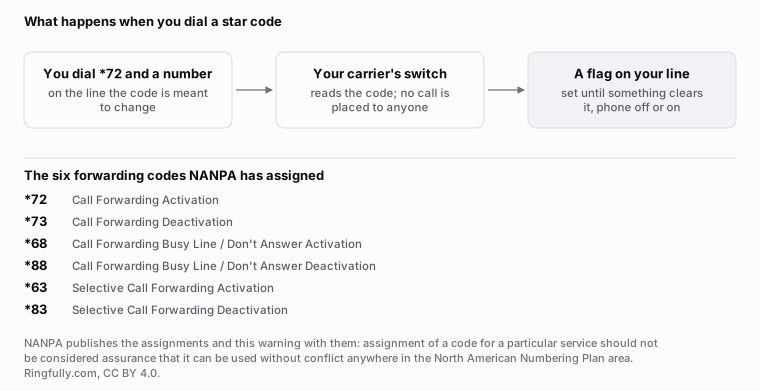
No call is placed when you dial a star code. What changes is a setting on your line, held in the network.
Reuse this figure anywhere, including commercially, with credit to Ringfully and a link back to this page. CC BY 4.0.
Who assigns them, and why they still vary
The codes are assigned by NANPA under guidelines developed by the Industry Numbering Committee, which is sponsored by ATIS. There is a real list, kept by a real administrator, and it is not folklore.
It is also not a rule. The administrator's own page carries this warning, and it is the single most useful sentence anybody has written about star codes:
Assignment of a VSC by NANPA for a particular service or feature should not be considered assurance that the assigned code can be used without conflict anywhere in the North American Numbering Plan area.
That is an administrator saying, in its own words, that the list coordinates rather than compels. The same page notes there is already some inconsistency in how codes are used for specific features.
Three things make the drift worse in practice. Wireless carriers layer their own codes on top. Cable and internet phone providers implement a subset and rename the rest. And any phone system between you and the outside world can intercept a code before the carrier ever sees it, which is why a code that works from a cell phone can do nothing from the desk phone next to it.
The forwarding codes NANPA has assigned
Six of them, verbatim from the assignment list:
| Code | Assigned name |
|---|---|
*72 | Call Forwarding Activation |
*73 | Call Forwarding Deactivation |
*68 | Call Forwarding Busy Line / Don't Answer Activation |
*88 | Call Forwarding Busy Line / Don't Answer Deactivation |
*63 | Selective Call Forwarding Activation |
*83 | Selective Call Forwarding Deactivation |
The pattern is worth noticing because it makes the list easier to hold: the deactivation code is generally the activation code with the first digit raised by one, so 72 and 73 pair, 68 and 88 pair, 63 and 83 pair.
The distinction between the first pair and the second is the difference between forwarding everything and forwarding only when you are busy or absent, which is a bigger decision than the two digits suggest: the four types of call forwarding.
Why *67 is a different kind of code
*67 turns up in every star-code list and it has nothing to do with forwarding. NANPA assigns it as Calling Number Delivery Blocking: it hides your number on the next call you place. Its neighbours on the list are the same shape:
*65and*85, Calling Number Delivery activation and deactivation*77and*87, Anonymous Call Rejection*69, Automatic Recall*57, Customer Originated Trace
The only thing these share with the forwarding codes is the dialling pattern. They are on one list because they are all instructions to the switch rather than destinations, which is the definition of a vertical service code and the reason the category exists at all.
How to find the codes that are true for your line
Ask the carrier that sends you the bill, then test it. Not the carrier your friend has, and not the list at the top of a search result, which is describing a network that is probably not yours.
The test takes five minutes and answers questions no list can:
- Dial the activation code with a colleague's number and listen for the confirmation.
- Call your line from a third phone and see where it lands.
- Dial the deactivation code, call again, and confirm it stopped.
- Note what the destination phone displayed, because that varies too.
If step three does nothing, you have found the most common star-code problem there is: forwarding that was set from a different device or a different portal, and does not answer to the code you are dialling.
Star codes and a phone system
Star codes are a per-line control, and their limitation is the limitation of the line: one destination, no idea what time it is, no way to offer a caller a choice, no record of what happened.
Ringfully does not use star codes for any of this, and there is nothing on your line to dial. What happens to a call is a flow you drew: a Business hours block decides whether you are open, a Collect digits / Menu block offers the caller a choice if you want one, Transfer to queue offers the call to the people who should take it, and Voicemail catches the rest. You change it by editing the flow and pressing publish rather than by dialling a code and hoping. That mechanism is written up in change your auto attendant menu yourself.
For what the redirect actually does to a call once a code has switched it on, see how call forwarding actually works. The rest of the subject lives under call control. If you are dialling codes today and cannot tell what state your line is in, tell us what it does.
The code table above is quoted from NANPA's published assignments and is not a claim about any particular network. Codes on wireless, cable and hosted services differ, and your carrier is the authority for your own line.
Questions people ask
- What is the code to forward calls?
- *72 on most North American lines, followed by the destination number. NANPA assigns *72 as Call Forwarding Activation and *73 as Call Forwarding Deactivation. Assigned is not the same as guaranteed: the administrator itself says a code may conflict on some networks.
- What is the difference between *72 and *68?
- *72 is assigned as plain Call Forwarding Activation, which means every call. *68 is assigned as Call Forwarding Busy Line and Don't Answer Activation, which only redirects when you are on the phone or nobody picks up. Not every carrier offers the second.
- Why does a star code do something different on my line?
- Because assignment is a coordination exercise, not a mandate. NANPA publishes the list and warns that an assignment should not be treated as assurance the code works that way everywhere. Cell networks, cable providers and phone systems all overlay their own codes.
- Does *67 forward calls?
- No. *67 is Calling Number Delivery Blocking: it hides your number on the next outbound call. It is on the same list because it is dialled the same way, which is the only thing it shares with the forwarding codes.
- How do I find the codes that are true for my line?
- Ask the carrier that bills you, and test what they tell you from a third phone. A code list found in a search result describes somebody else's network. The two minutes of testing are worth more than any published table, including the one on this page.
About the author
John
Owner and CEO
Owner and CEO with over 10 years of experience in the IT industry, including more than 5 years specializing in VoIP and cloud communications. Experienced in designing, deploying, and supporting reliable communication solutions for businesses.

Keep reading
If callers get lost in the transfer, tell us how a call moves between your people today, and we will show you the same buttons in our app.