Blog
Call forwarding on an iPhone
The Call Forwarding switch in Settings is not an iPhone feature. It asks your carrier to redirect the line. Why that matters, and why it goes missing.
John · Owner and CEO · 5 min read ·
The Call Forwarding switch in an iPhone's settings does not run on the iPhone. It sends a request to your carrier, and the carrier's network redirects the calls, whether the handset is on or off. That is why forwarding survives a flat battery, and why the switch is missing on some accounts.
Where the switch is, and what it does
Settings, then Apps, then Phone, then Call Forwarding. Turn it on, type the number you want calls to land on, and a small forwarding icon appears in the status bar. Apple's guide to setting up call forwarding on iPhone is the whole procedure and it is four taps long.
Two sentences in that guide say more about the feature than the procedure does. The setting is described as available if you have cellular service through a GSM network; on a CDMA network, Apple tells you to contact your carrier. And it warns that you have to be in range of the cellular network when you set it, or calls will not be forwarded.
Neither of those would be true of a feature that lived on the phone. They are true because the switch is a message to the carrier, and the carrier is the thing doing the forwarding.
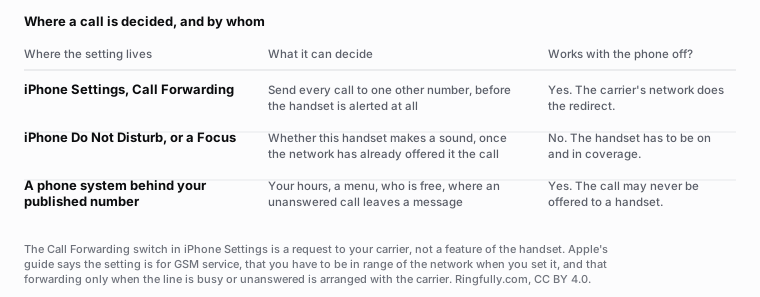
The one question that separates a handset setting from a network one: does it still do anything when the phone is off?
Reuse this figure anywhere, including commercially, with credit to Ringfully and a link back to this page. CC BY 4.0.
Why the switch is sometimes missing
If Call Forwarding is not in the Phone settings at all, the phone is not broken and the software is not out of date. Three ordinary explanations cover almost every case:
- The network. Apple's guide points CDMA subscribers at the carrier rather than at the setting.
- The plan. Carriers can and do withhold the feature on some accounts, particularly prepaid ones.
- The line. A carrier that provisions forwarding as a separate service will not show the switch until it is added.
All three are answered by the carrier, which is the general rule with this feature: if it is not behaving, the phone is not where the answer is.
Forwarding only when you are busy or do not answer
The iPhone switch is the unconditional kind. Every call, immediately, before the handset does anything.
Apple's guide is explicit that the conditional versions, when the line is busy or not in service, are arranged with the carrier. Some carriers expose them as star codes you dial from the handset, some only through their support line, and the codes differ between them. What each condition means and the order they are tested in is a subject of its own: the four types of call forwarding, and the codes themselves are in call forwarding star codes explained.
Do Not Disturb is not forwarding
Worth separating, because they get used for the same purpose and behave nothing alike.
Do Not Disturb and Focus run on the handset. The network has already offered the call to the phone by the time either of them has an opinion; all they decide is whether the phone makes a sound. The caller still reaches your line, so they end up in your voicemail.
Call forwarding runs in the network. The handset is never offered the call at all, so the caller lands wherever you sent them, and your voicemail never sees it.
If what you actually want is "calls should reach somebody else while I am with a customer", those two settings give you two very different results.
The carrier's forwarding is not a phone system
This is the honest limit of the feature, and it is worth saying because forwarding is often the first thing a small business tries.
Carrier forwarding sends one line to one other line. It cannot look at the time of day, cannot ring two people, cannot offer a caller a choice, cannot leave a message that names your business, and cannot tell the person answering that this was a work call. That last one is the practical killer: a forwarded business number rings on a personal phone like a friend calling, and gets answered like one.
A phone system sits behind the published number and decides before anything rings. Ringfully's own phone runs in a browser tab or the Windows desktop app, and a call is offered to whoever should take it rather than redirected to one nominated number. We do not build anything that lives inside iOS, and the carrier's forwarding switch is not ours to change. What we replace is the reason people reach for it.
The full picture of what forwarding does to a call is in how call forwarding actually works, and the rest of this subject sits under call control.
What to check before you rely on it
Four things, in ten minutes, from a third phone:
- Does it forward at all? Call your number and see where it lands.
- What does the destination see? The original caller's number, or yours.
- What happens when the destination is busy? Some carriers give the caller a busy tone rather than your voicemail.
- What does it cost? Forwarded minutes are billed to the line that forwards, so check the bill after a week rather than the brochure.
If the answers are not what you expected, tell us what your line does today and we will say whether forwarding is the reason. For what happens to the calls nobody catches, see what missed calls are actually worth.
Menu paths and carrier behaviour change. Apple's guide, linked above, is the current source for the iPhone half; the carrier half is your carrier's, and it varies by plan and by region.
Questions people ask
- Where is call forwarding on an iPhone?
- Settings, then Apps, then Phone, then Call Forwarding. Turn it on and enter the number. A forwarding icon appears in the status bar while it is active. Apple's guide notes the setting is for cellular service on a GSM network.
- Why is Call Forwarding missing from my iPhone settings?
- Because the setting is a request to the carrier, not a phone feature. Apple's guide says that on a CDMA network you contact your carrier instead, and carriers can withhold the option on some plans. A missing switch is an account question, not a phone fault.
- Does iPhone call forwarding work when the phone is off?
- Yes, once it is set. The redirect happens in the carrier's network before the handset is alerted. But you have to be in range of the cellular network at the moment you turn it on, because the phone has to get the instruction to the carrier.
- Can I forward only when I am busy or do not answer?
- Not from the iPhone switch, which is the always version. Apple's guide points you at the carrier for forwarding when the line is busy or not in service. Some carriers expose it as a star code, some only through their support line.
- Is Do Not Disturb the same as call forwarding?
- No, and the difference decides what a caller hears. Do Not Disturb runs on the handset after the network has already offered it the call, so the caller reaches your voicemail. Call forwarding runs in the network, so the call goes somewhere else entirely.
- Should I forward my business number to my iPhone?
- It works, and it has two costs. Forwarded minutes are billed to the line that forwards, and a forwarded call arrives looking like any other call, so it tends to get answered with the wrong greeting. Both are reasons businesses eventually stop doing it.
About the author
John
Owner and CEO
Owner and CEO with over 10 years of experience in the IT industry, including more than 5 years specializing in VoIP and cloud communications. Experienced in designing, deploying, and supporting reliable communication solutions for businesses.

Keep reading
If callers get lost in the transfer, tell us how a call moves between your people today, and we will show you the same buttons in our app.